
Notification channels
Parcel Notifications by SMS and Slack
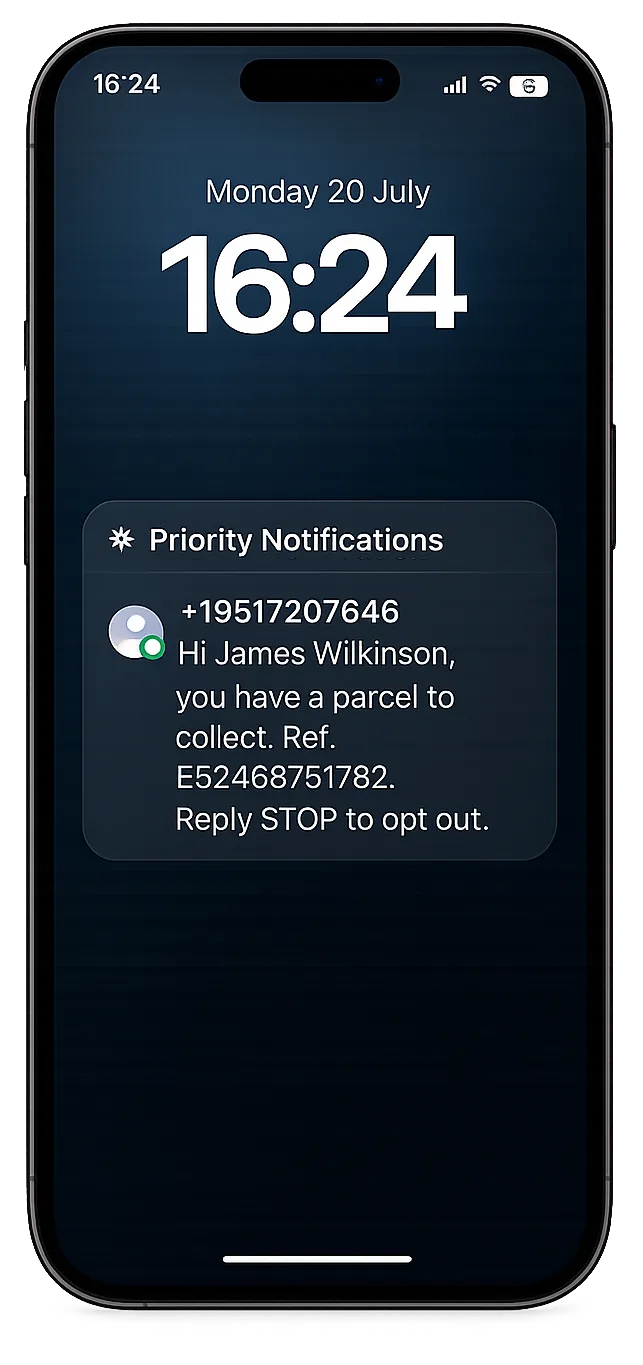
Reach people via the channels they read first. Text messages for those without a work inbox, and Slack for the teams already using it.
- SMS across USA and Europe
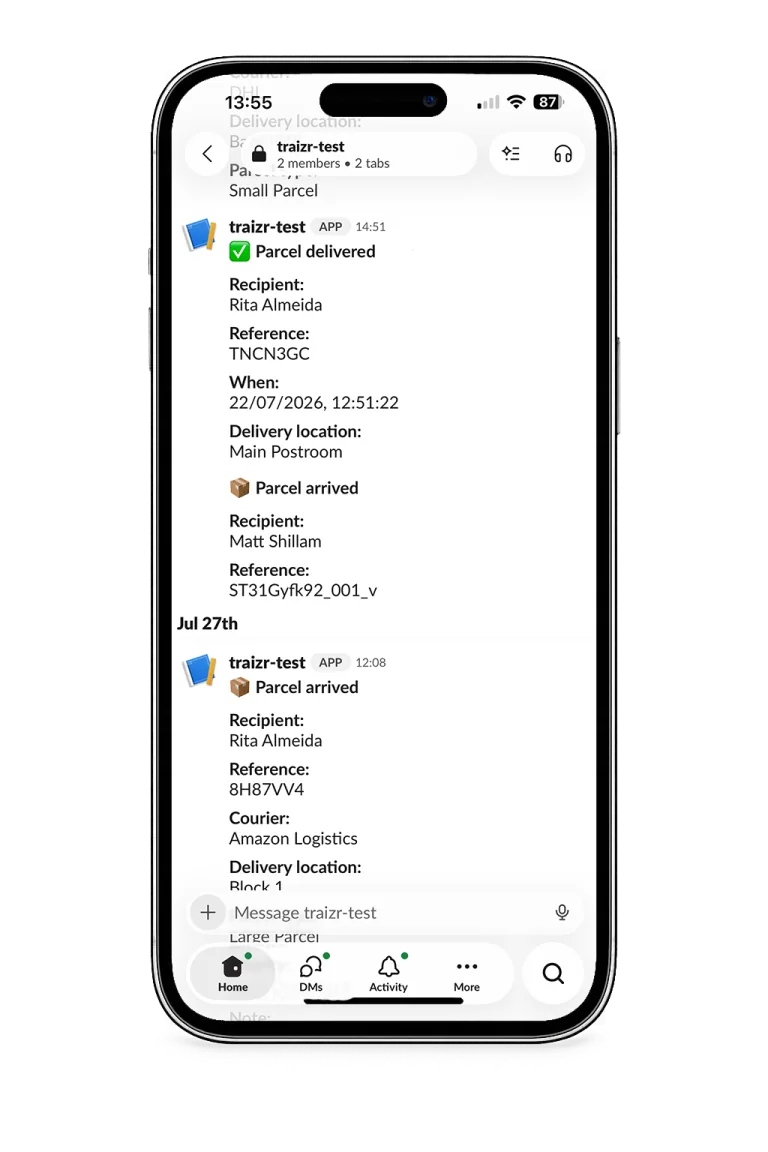
- Slack Messages Directly to Channel
- Opt out at Any Time
Looking at notifications as a whole rather than these two channels? Parcel notification software covers the wider picture, including what notifications do to collection times.
The channels
Two extra notification channels for two very different recipients
SMS
A text arrives on the device and gets read within minutes. For residents, students, contractors and site staff it is often the only channel you genuinely have, and it clears a shelf faster than anything else.
Coverage across the USA and Europe
Both are covered as standard. For anywhere else, a provider can be added for the region you operate in.
Slack, for teams
Once connected, the notification appears in your chosen Slack Channel. There is a short video of Slack notifications and one of SMS notifications if you would rather see them running.
Email Notifications
Email remains the solution for office staff.
Chosen per recipient
All notifications can be turned on and off per recipient.
The sequence
What gets sent, and when
-
It has arrived
Sent the moment the item is scanned in and matched to a recipient.
Sent onThe recipient's chosen channel: SMS, Slack, email or push. -
A reminder, if required
Automatic reminders chase anything left uncollected, on a schedule you set.
ConfigurableHow long to wait, how often to chase, and when to stop chasing and escalate instead. -
Held until a reasonable hour
Quiet hours stop an evening scan from texting somebody at home.
Applies toAny channel. -
Confirmation it was collected
The closing message.
RecordedWho collected it and when, alongside the proof captured at handover.
Notifications lead to collections - every collection recorded - See internal proof of delivery
What you can control
All of it included as standard, with no per-message pricing to work around.
-
SMS
Text notifications across the USA and Europe as standard, with a provider addable for any other region you operate in.
-
Slack
A live channel with its own section in the admin. Notifications land in the workspace your team already has open.
-
Email
Still the right choice for desk-based staff who use it, and still included rather than traded away.
-
Mobile push
The fastest channel for anyone with the app, and the one that carries the QR collection code.
-
Channel per recipient
Set on the person rather than the building, so a mixed site never has to pick one channel for everybody.
-
Automatic reminders
Chase uncollected items on your own schedule. This is the single behaviour that keeps a shelf clear.
-
Quiet hours
Hold messages outside reasonable hours, so a late scan does not wake somebody up and cost you the channel.
-
Configurable content
Say what your building needs said. A residence needs the collection point and hours; an office usually needs neither.
-
Thirteen languages
Each recipient is notified in their own language, which changes response rates on international and student sites.
-
Opt-out respected
A recipient who opts out is opted out across the system, not just on the channel they used to tell you.
-
Collection built in
Notifications carry what the recipient needs to collect, including the QR code where that is how your handover works.
-
Visible in reporting
The time somebody was notified and the time they collected both sit on the record, so you can see which channels work.
Which channel suits which building
A rough guide rather than a rule. Most sites end up running more than one, and that is the right outcome.
-
Student accommodation
SMS, almost always. Students rarely read the accommodation email account, and September volumes make chasing by hand impossible.
Student accommodation parcels -
Residential buildings
SMS for residents, who have no work inbox with you at all, plus quiet hours so evening deliveries stay civil.
Apartment package management -
Corporate offices
Slack for the teams that have moved into it, email for those that have not. Often both in the same building.
Office mailroom software -
Coworking spaces
Members run their own systems entirely, so SMS is the common denominator and Slack suits the larger member companies.
Coworking mailroom software -
Universities
SMS for students and email for staff, in thirteen languages, across a campus where many recipients are international.
University mailroom software -
Hospitals and shift sites
Anywhere staff work shifts away from a desk. The notification has to find them mid-round or it finds them too late.
Hospital parcel tracking
Email only against every channel
The mailroom process is identical in both columns. Only the way people find out has changed.
| Email only | With Traizr |
|---|---|
| One channel for every recipient | Channel chosen per person |
| Nothing for people without a work inbox | SMS to the number they gave you |
| Desk teams miss it in a busy inbox | Slack, where they already are |
| One message and no follow-up | Automatic reminders on your schedule |
| Alerts at any hour | Quiet hours, so the channel survives |
| Everybody notified in one language | Thirteen languages, per recipient |
| Opt-outs tracked by hand | Respected across the whole system |
| No idea what is working | Notified and collected times on every record |
Frequently asked questions
Everything you need to know before getting in touch.
Why does the notification channel matter so much?
Because uncollected items are the expensive part of a mailroom, and nobody collects an item they do not know about. Email is the default in most buildings and it is also the channel most likely to be missed, especially by anyone who does not sit at a desk. Changing the channel is the cheapest fix available: nothing about the mailroom process changes, and the shelf empties faster.
Which countries does SMS cover?
The USA and Europe are covered as standard. For anywhere else, a provider can be added for the region you operate in, so coverage is rarely the constraint people expect it to be. If you have sites somewhere specific, tell us where and we will confirm rather than guess.
How does the Slack integration work?
Slack is a live channel with its own section in the Traizr admin. Once it is connected, recipients are notified in Slack in the same way they would be by email or SMS. For a desk-based team, that means the alert appears in the tool they already have open.
Can different people get different channels?
Yes, and that is usually the right answer rather than picking one channel for everybody. A building often contains both office staff who live in Slack and residents or contractors who have no work account at all. The channel is set on the recipient record, so each person is reached the way that works for them.
What happens if somebody does not collect?
Reminders chase automatically on a schedule you set, so an item that goes uncollected keeps prompting instead of quietly joining the pile. That one behaviour is the difference between a shelf that clears and a shelf that grows.
Can we stop notifications going out overnight?
Yes. Quiet hours hold messages, so a delivery scanned at seven in the evening does not text a resident at seven in the evening. This matters more for SMS than for any other channel, because a text is intrusive by design.
Are notifications sent in the recipient's language?
Yes. Traizr runs in thirteen languages, and each recipient's own setting decides what they receive. In student accommodation and international offices this makes a real difference to whether a notification gets acted on. See multilingual mailroom software.
How is SMS consent handled?
Recipients can opt out, and an opt-out is respected across the whole system rather than only on the channel they used to tell you. Our SMS terms set out how the messaging works. It is worth reading if you are notifying residents or students rather than employees, because the consent position is different.
Do we still get email and push?
Yes. Email and mobile push are both standard. SMS and Slack are additions to them rather than replacements, and most buildings end up using three of the four, split by who the recipient is.
What does a notification actually say?
What arrived, where it is, and how to collect it. The content is configurable, which matters because the useful detail differs by building. A residence needs the collection point and the opening hours, and an office usually needs neither.
Want the wider view? Parcel notification software covers notifications as a whole, and the integrations list shows how recipient details stay current so the right person gets the message.
Other things the platform does
Same system, different capabilities.
-
Multi-tenant mailroom software
Many tenants on one platform, each seeing only their own mail, with a superadmin that creates and configures all of them.
Read the page -
On-premise mailroom software
Install on your own infrastructure or in a container inside your network, and run the mailroom with no outbound connection at all.
Read the page -
Multi-hop mail routing
Send an item onward through postrooms, buildings, campuses and countries, with one person accountable for each leg.
Read the page -
In-app support from real people
Ask a question from inside the product and get an answer from someone who knows it, not a ticket number and a queue.
Read the page -
Smart parcel label scanning
Scan any barcode on a courier label and Traizr finds the parcel, reads the recipient's name and records the box count and PO number.
Read the page -
Request Open and Scan
Staff who are away from the office ask for an item to be opened and scanned from their arrival email. The scan is emailed to them and not kept by Traizr.
Read the page -
Collection and delivery requests
A branded web form for booking a parcel collection or an internal delivery. No login needed, and every request gets a reference number.
Read the page -
Virtual office software
Run a virtual office or business centre address: photograph every item, act on client instructions, and bill for what you handled.
Read the page
Ready to Simplify Your Building?
Tell us who receives parcels in your building and we will show you which channel reaches each group, and what that does to your uncollected pile. About 20 minutes.