
Virtual office
Virtual Office Software for Address and Mail Handling
Manage virtual office mail from arrival to completion. Photograph each item, notify the client and let them choose whether to scan, forward, shred, recycle or collect it.
For practical advice on running the service itself, see our virtual office management guide.
- Item Photographed on arrival
- Recipient chooses what happens next
- Mailroom carries out instruction
What virtual office software is
Virtual office software manages incoming mail for clients who use your business address without working from the building. Traizr records each item when it arrives, notifies the client and manages their instructions through to completion. It replaces spreadsheets, shared inboxes and manual notes with one searchable record of every item and action.
The workflow
From Delivery to Decision to Instruction
Five steps to delivery
Photograph it & Notify Recipient
Staff log the item on a phone or tablet and photograph it while it is still sealed, giving the recipient enough information to decide what to do next.
Traizr notifies the recipient
The item is matched to the correct client and Traizr sends a notification automatically.
The recipient receives a notification
The client receives the photograph by app, email or SMS and can respond wherever they are.
They choose what happens next
The client chooses scan, forward, shred, recycle or collection and the request appears in the mailroom queue.
Mailroom carries out instruction
Staff complete the request and Traizr records what was done. If scanning was requested, the file is stored against the item.
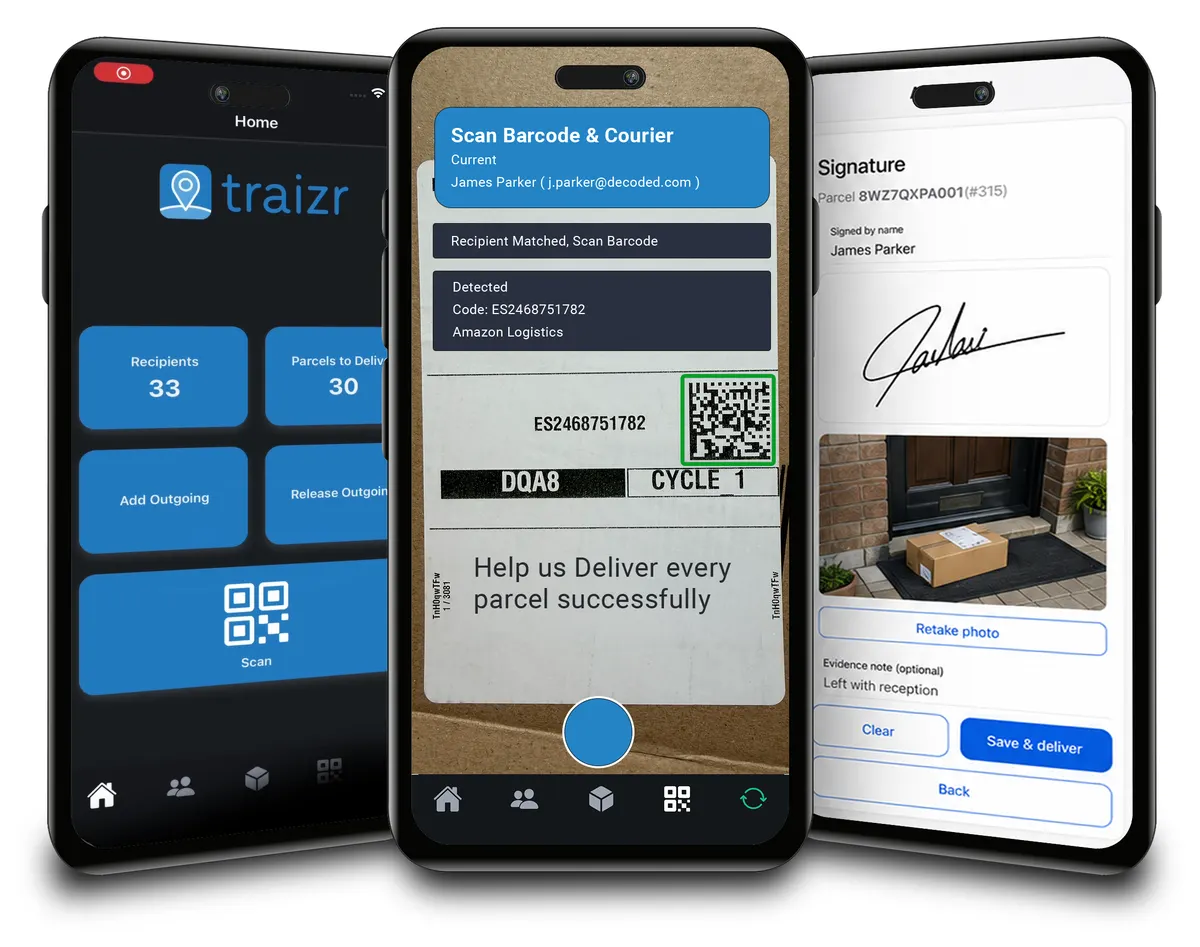
- It arrivesA letter or parcel is delivered to your address for one of your clients.
- Photographed and loggedStaff photograph the sealed item and log it against the client's account. Nothing is opened.
- The client is notifiedA notification with the photograph is sent by app, email or SMS.
- The client choosesThey select scan, forward, shred, recycle or collect in person, from wherever they are.
- Staff complete the instructionThe action is carried out and recorded with the staff member's name and the time.
- The record is updatedThe item, instruction, action and any postage are stored on the client's account.
Who is doing what, at each point
A manual virtual office usually breaks down at the handovers. The client cannot see what has arrived, staff cannot easily see what the client requested, and completed actions may be recorded somewhere else. Traizr keeps the item, instruction, status and history together so everyone works from the same record.
| Arrives | Logged | Notified | Instructed | Carried out | Recorded | |
|---|---|---|---|---|---|---|
| Your client | Nothing at this step | Nothing at this step | Sees the photograph | Chooses the action | Nothing at this step | Can see the full history |
| Your team | Takes the delivery | Photographs and logs it | Nothing at this step | Nothing at this step | Scans, forwards, shreds, recycles or hands over | Nothing at this step |
| Traizr | Nothing at this step | Links the item to the client account | Sends the notification | Records the instruction | Records who acted, and when | Totals usage and postage per client |
For the operational side, including sorting incoming mail and dealing with unanswered items, see the virtual office management guide.
Five things a recipient can request
Clients choose one of five clear actions, making it quick to respond and easy for staff to process each request.
- Scan itThe item is opened and the contents scanned and attached to its record.
- Forward itThe item is sent to the client's chosen address, with the carrier and postage recorded.
- Shred itThe item is securely destroyed, and the instruction and completion are recorded.
- Recycle itThe item is disposed of. Most recycled items are unopened marketing post.
- Collect in personThe client comes to the address for the item, and the handover is recorded with a QR code.
-
Scan it
Open the item and scan the contents for the client.
RecordedWho opened and scanned it, when it was completed and the scanned file itself. -
Forward it
Send the physical item to the client's forwarding address.
RecordedThe destination, date sent, member of staff and postage cost. -
Shred it
Securely destroy mail the client no longer needs.
RecordedThe client's request, who completed it and when it was done. -
Recycle it
Dispose of unwanted marketing mail and other non-sensitive items.
RecordedThe client's instruction and the date it was completed. -
Collect in person
Hold the item for the client to collect from your address.
RecordedThe handover, confirmed with a QR code in the app, and who collected it.
Every action is recorded because virtual office operators are handling someone else's correspondence. If a client asks what happened to an item, there is a clear record of who handled it and when. It applies the same principle as internal proof of delivery to virtual office mail.
The client account, and what a virtual office record holds
Each client has one record containing the information your team needs to receive, manage and forward their mail correctly.
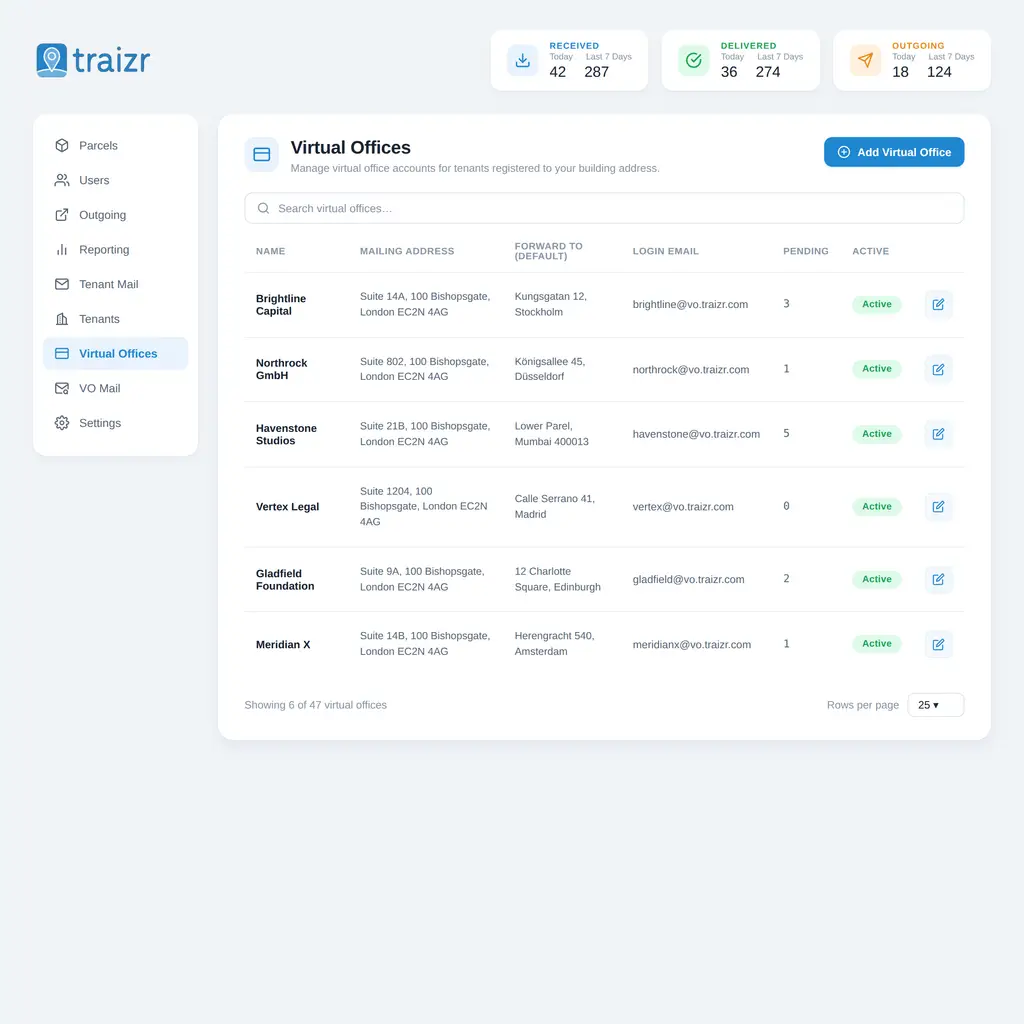
A virtual office client is simply a record in Traizr, so adding a new client is quick and does not require a separate installation. The record holds their virtual office address, forwarding address, login details and the number of items currently waiting for instructions.
The pending count gives staff a simple way to spot clients with unanswered mail. Instead of items sitting unnoticed on a shelf, outstanding instructions remain visible until they are dealt with.
Forwarding addresses are also held against the client record, giving staff one current address to work from rather than relying on an old email, form or spreadsheet.
For organisations managing clients across several locations, see business address management.
The mail queue, the source of all knowledge
One list shows every item, what the client requested and whether the work has been completed.
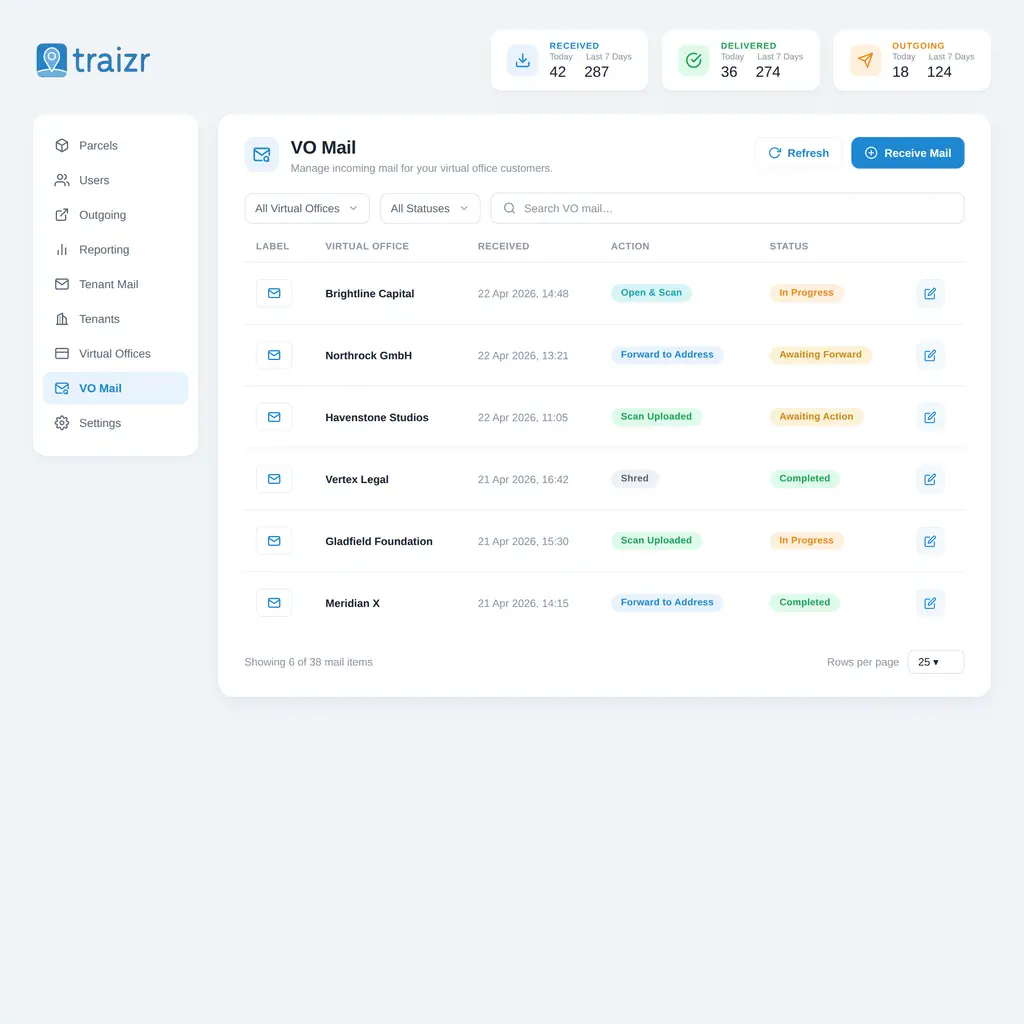
The mail queue is the main working screen. Each row shows the client, date received, requested action and current status, making it easy to see what needs attention.
The instruction and status are separate because they answer different questions. "Forward to address" tells staff what the client wants. "Awaiting forward" tells them it has not yet been done. That distinction makes outstanding work easy to find.
It also gives staff a clear answer when a client asks about an item. Search the record to see when the instruction was received, who completed it and any files attached to it.
All Virtual Office systems include . . .
Included as standard, with no dedicated scanning hardware required.
-
Photograph at receipt
Photograph each item as it arrives so the client can see what has been received.
-
Client mail accounts
Keep each client's address, instructions, forwarding details and mail history together.
-
Automatic notifications
Notify clients by app, email or SMS when mail arrives, with reminders for unanswered items.
-
Scan to file
Scan requested contents and keep the file attached to the original mail record.
-
Forwarding with postage
Record the forwarding address and postage cost when an item is sent.
-
Shred and recycle requests
Record disposal requests with the person who completed them and the time they were carried out.
-
Usage per client
Report on items received, scanned and forwarded by client and date range.
-
More than one address
Manage multiple virtual office addresses from the same platform.
-
Collection in person
Allow clients to collect physical mail directly where required.
-
Searchable history
Search previous items by client, sender, reference or date.
-
Role-based access
Control which members of staff can access different parts of the virtual office workflow.
-
Thirteen languages
Send client notifications in their preferred language.
-
Reminders that chase
Keep unanswered mail visible and continue prompting clients for an instruction.
-
Closed accounts flagged
Flag mail for clients who have left instead of processing it as normal.
-
Integrations
Connect Traizr with other systems so client and recipient information can be maintained centrally.
-
No dedicated hardware
Use standard phones and tablets instead of dedicated scanning equipment.
Notifications, and how clients answer them
Clients need to know when mail arrives and be able to respond without calling your team.
A virtual office client cannot see a pigeonhole or walk past reception, so reliable notifications are essential. Traizr sends an alert as soon as an item is logged, giving the client a clear route to decide what happens next.
The photograph is included with the notification, giving the client more information than a simple "you have mail" message. In many cases they can recognise the sender and make a decision immediately.
Notifications can be sent through the app, email or SMS, allowing each client to use the channel that suits them.
If the client does not respond, the item remains visible as awaiting instruction and reminders can continue. This helps prevent unanswered mail from sitting unnoticed.
See SMS and Slack notifications for more information about notification options.
Running more than one address
Virtual office operators often grow beyond a single location. Traizr lets several addresses run on one platform rather than creating a separate spreadsheet or process for every building.
Each address can have its own client list while reporting can cover the wider operation. Staff working across several locations can use the same login and app, and a client's history remains available if their address changes.
If separate locations need to operate as independent organisations rather than branches of the same business, see multi-tenant mailroom software.
Virtual office mail alongside a physical mailroom
Handle mail for on-site tenants and virtual office clients through the same intake process.
Business centres often receive one delivery containing mail for both physical tenants and virtual office clients. Staff should not need two systems to process the same incoming post.
Both workflows begin in the same way: the item is logged and matched to a recipient. An on-site tenant can be notified for collection, while a virtual office client receives the item photograph and chooses an instruction. Traizr manages both from the same platform.
| Arrives | Logged | Notified | What happens next | Proof | |
|---|---|---|---|---|---|
| People in the building | Same delivery round | Logged to a person or a desk | Notified automatically | They come and collect it | Signature or photograph at handover |
| Clients who are not | Same delivery round | Logged to a client account | Notified with a photograph of the item | They choose scan, forward, shred, recycle or collection | The action, who completed it, and any postage |
Using one system removes the need to separate mail manually before it is logged and gives you one searchable record of everything handled across the building.
For physical mailroom operations, see mailroom management software, digital mailroom and internal package tracking.
Who runs a virtual office
Virtual office mail services are used across business centres, serviced offices, coworking spaces and other organisations offering a professional business address.
Choosing virtual office software: what to ask
These are useful questions to ask any virtual office software provider before making a decision.
Is the client's instruction a record, or an email?
Client instructions should be stored against the mail item rather than sitting in a separate inbox. Ask whether each request is timestamped, assigned to the item and marked as completed by a named member of staff.
Is the photograph taken at intake, or is it optional?
Taking a photograph during intake gives every client the same experience and removes reliance on staff remembering an extra step. Ask whether photography is built into the normal logging workflow.
Can you find one item from two years ago?
Ask to see an old item found through search and check whether its scan, instructions and handling history are still attached to the same record.
What does it tell you at the end of the month?
Check whether reporting shows items received, scanned and forwarded by client, together with postage where relevant, and whether the results can be exported for billing or analysis.
Who can open a scan?
Mail scans can contain sensitive information. Ask whether permissions can separate staff who log incoming mail from those allowed to view scanned contents and reporting.
What happens to post for a client who has left?
Mail often continues to arrive after a client leaves. Ask whether incoming items for closed accounts are clearly flagged so staff do not process them as active mail.
What happens when you open a second address?
Ask whether another location can be added within the same system and whether reporting can cover all addresses without separate installations, logins or manual consolidation.
What has to be installed, bought or mounted?
Check whether the system needs dedicated scanners, terminals or printers and what happens when that hardware is unavailable. Mobile-based workflows can make the operation much more flexible.
How long does adding a client take, and who can do it?
Virtual office client lists change regularly, so adding and closing accounts should be straightforward. Ask to see a new client created during the demonstration rather than relying on a description of the process.
Running it by hand against running it on Traizr
Manual processes can work at low volumes, but they become harder to manage as the number of clients and items grows.
| By hand | With Traizr |
|---|---|
| A message saying post has arrived | A photograph of the item, sent automatically |
| Instructions by email, text and phone | One request - One action |
| Scans emailed and then lost | Scan stored against the item permanently |
| Forwarding address from the sign-up form | Held on the client record and kept current |
| Postage absorbed as an overhead | Captured against the client when it is sent |
| Monthly billing reconstructed from notes | Usage per client over any date range, exportable |
| No evidence an item was handled | Every action named, timestamped and searchable |
| Post for closed accounts processed anyway | Flagged rather than quietly handled |
Security, access and where your data resides
Virtual office systems handle private correspondence, scanned documents and client information, so access needs to be controlled carefully.
Traizr uses role-based access so different staff members can be given only the permissions they need. Logging incoming mail, completing instructions, viewing scans and accessing reports do not need to be available to everyone. Clients can only see their own account.
Actions are recorded with the user and time, creating a clear audit history. If a client asks what happened to an item, staff can check the record rather than relying on memory.
Traizr is cloud hosted by default and organisations with closed networks or specific infrastructure requirements can also explore on-premise deployment.
See the Trust Centre and security and compliance pages for our current position on security, certifications, subprocessors and data handling. Requirements for address services and identity checks vary by jurisdiction.
Frequently asked questions
Common questions about using Traizr for virtual office mail management.
What is virtual office software?
Virtual office software manages the mail handled for clients using your business address. Incoming post is photographed and logged, the client is notified, and they choose whether it should be scanned, forwarded, shredded or recycled. Each instruction and action stays recorded against their account.
Can clients see their mail before deciding what to do with it?
Yes. The envelope is photographed when it is logged, so the client can see the sender and type of item before deciding what happens next. This often removes the need for a phone call or email.
What actions can a client request?
Clients can request scan, forward, shred, recycle or collection in person. Each request is recorded with the action taken, the member of staff who completed it and the time it was completed.
Can Traizr handle billing for virtual office clients?
Traizr records the information commonly used for virtual office billing, including items received, scans, forwarding and postage costs. Reports can be produced by client and date range. Traizr does not raise invoices itself, but it provides the usage data needed to create them.
How many clients can one address handle?
There is no software limit. Clients are records within Traizr rather than separate installations. If you operate several addresses, multi-tenant mailroom software explains how separate operations can be managed.
Can we run this alongside a physical mailroom?
Yes. Business centres often handle mail for both on-site tenants and virtual office clients. The same Traizr platform and mobile app can manage both workflows, with the recipient record determining what happens after an item is logged.
What happens to mail for a client who has left?
Closed accounts are flagged when new mail arrives instead of being processed as normal. This gives staff a clear indication that the recipient is no longer active and the item needs separate handling.
Is there a limit on how long records are kept?
No fixed limit is imposed by the software. Item histories and attached scans can remain available for as long as your organisation requires them, subject to your own retention policies.
Do clients need to install an app?
No. Clients can receive notifications by email or SMS as well as through the app. The app is useful for push notifications and in-person collection, but it is not required for every client.
Can we move a client to a different address without losing their history?
Yes. The address is held on the client record, so changing it does not remove previous mail, scans or instructions. For organisations operating several addresses, business address management explains the wider setup.
Who can see a client's mail?
Access is role-based. Clients only see their own account, while staff permissions can be restricted according to their role. This means someone logging incoming mail does not necessarily need access to scanned contents or wider reporting.
What happens if a client never responds to a notification?
The item remains visible as awaiting instruction and reminders can continue to be sent. Traizr does not automatically close an item that nobody has acted on. Your policy determines how long unclaimed mail is held, and the operations guide covers that side of the process.
Can we run virtual office mail and a normal mailroom on the same system?
Yes. Both workflows use the same platform and mobile app. Mail is logged against the recipient, and Traizr then follows the appropriate process for an on-site tenant or virtual office client.
Does Traizr integrate with the systems we already run?
Traizr supports integrations with a range of directory, property and business systems so recipient information does not need to be maintained manually in several places. The integrations page lists the available options.
If you also manage mail for people working inside the building, see our mailroom management software.
The rest of the virtual office cluster
This page is the overview. Each of these goes deeper on one part of it.
-
Virtual mailbox software
Create and number mailboxes, give each client their own inbox, and keep the full history of every item handled.
Read the page -
Mail scanning software
Items are opened and scanned only when the client asks, and the scan is stored on the item record.
Read the page -
Mail forwarding software
Forward items to the address the client chooses, and record the carrier and postage against their account.
Read the page -
Business address management
Record which client is registered at each address, and manage their mail across every location you run.
Read the page -
Virtual office management
The operations guide: the daily loop, the policies to write down before you need them, and how operators price the service.
Read the page -
Mailroom management software
What the software has to do, what to ask a vendor, and how Traizr compares. The page to start on if you are buying.
Read the page -
Internal package tracking software
Follow an item through every hop inside your buildings, with a scan at each handover and a record of who held it.
Read the page
Ready to Simplify Your Building?
See how Traizr could handle your virtual office workflow in a short demonstration using the way your operation works today.