
Internal package tracking
Internal Package Tracking Software
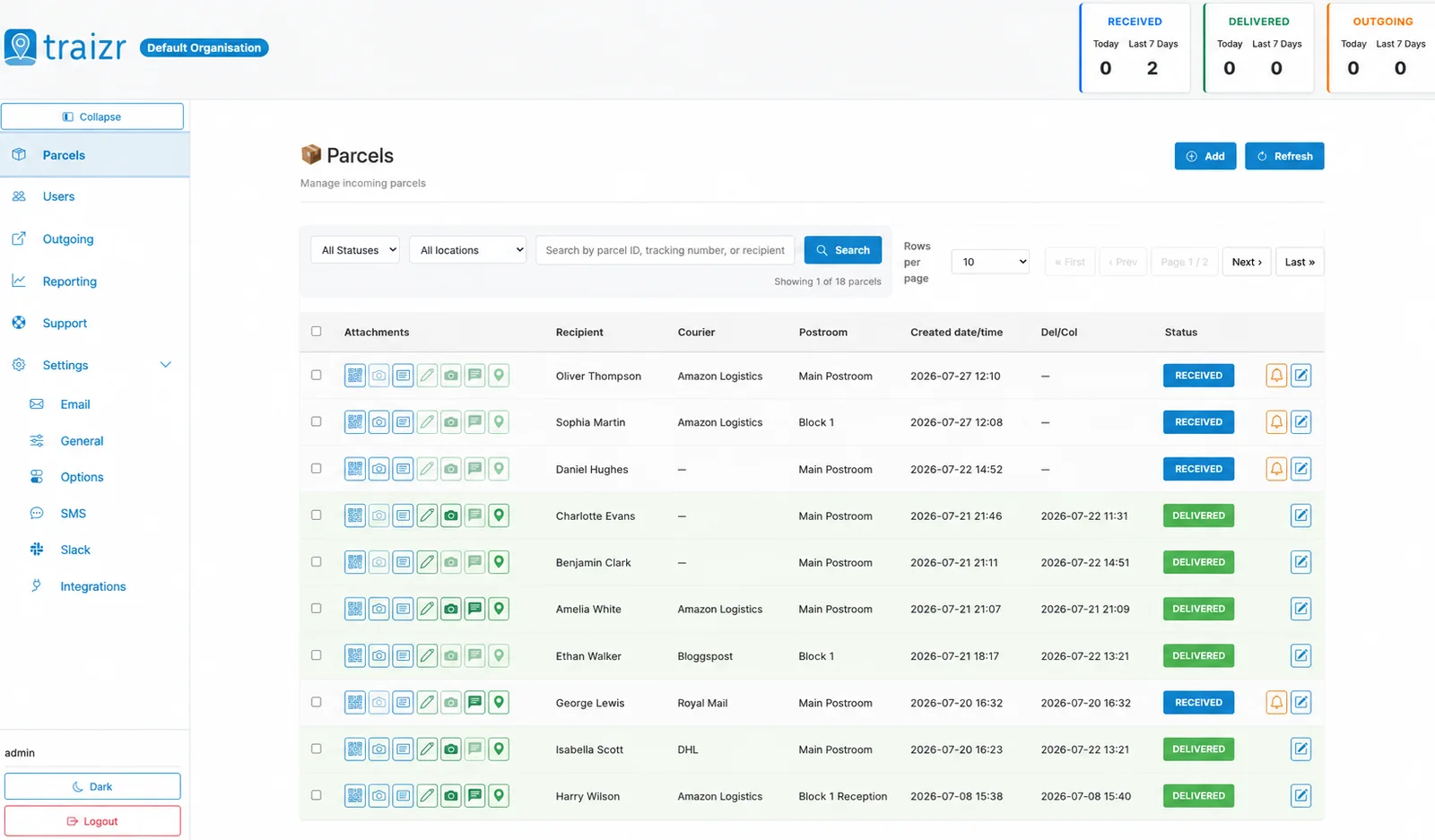
Track every package, parcel and internal delivery from receipt to final handover with a complete digital chain of custody.
Courier tracking stops at your front door. Traizr picks the item up there and follows it through reception, the postroom, every department and every site it travels to, until somebody signs for it. One record, built by the people already handling the item.
- No scanners needed
- Every hop recorded
- Works offline
Where internal tracking breaks down
Items go missing in the hours and days after delivery, in the gap between arriving and reaching the person they were sent to.
The courier's job ends with a scan at reception. From that point the item is your responsibility, and in most buildings the record of what happens next is a book, a shared spreadsheet, or somebody's memory. That works until the day it matters: an audit, a dispute, a missing laptop, a signed contract that nobody can account for.
These are the failure modes that come up in almost every conversation we have with a facilities or mailroom team.
- The paper logA logbook records that something arrived. It rarely records where it went next, and it cannot be searched.
- Spreadsheets that driftTwo people edit different copies, a column gets sorted without the rest of the row, and the file quietly stops being true.
- Nobody knows where it is now"It came in on Tuesday" is not a location. Somebody walks to the shelf to check, and often walks back none the wiser.
- The handover nobody recordedAn item moves from reception to a department and the trail stops there, which is exactly where most investigations begin.
- Items that sit for weeksNothing chases the recipient, so parcels accumulate at reception and the pile becomes its own security problem.
- No proof of receiptWithout a signature, a photo or a scan at collection, "I never got it" cannot be answered with anything but an apology.
- Disputes you cannot settleA supplier says it was delivered, the recipient says it never arrived, and there is no evidence either way.
- Every site keeps its own versionThree buildings, three processes, three formats, and no way to see the portfolio as one operation.
The workflow
How Traizr works
Scan in on arrival
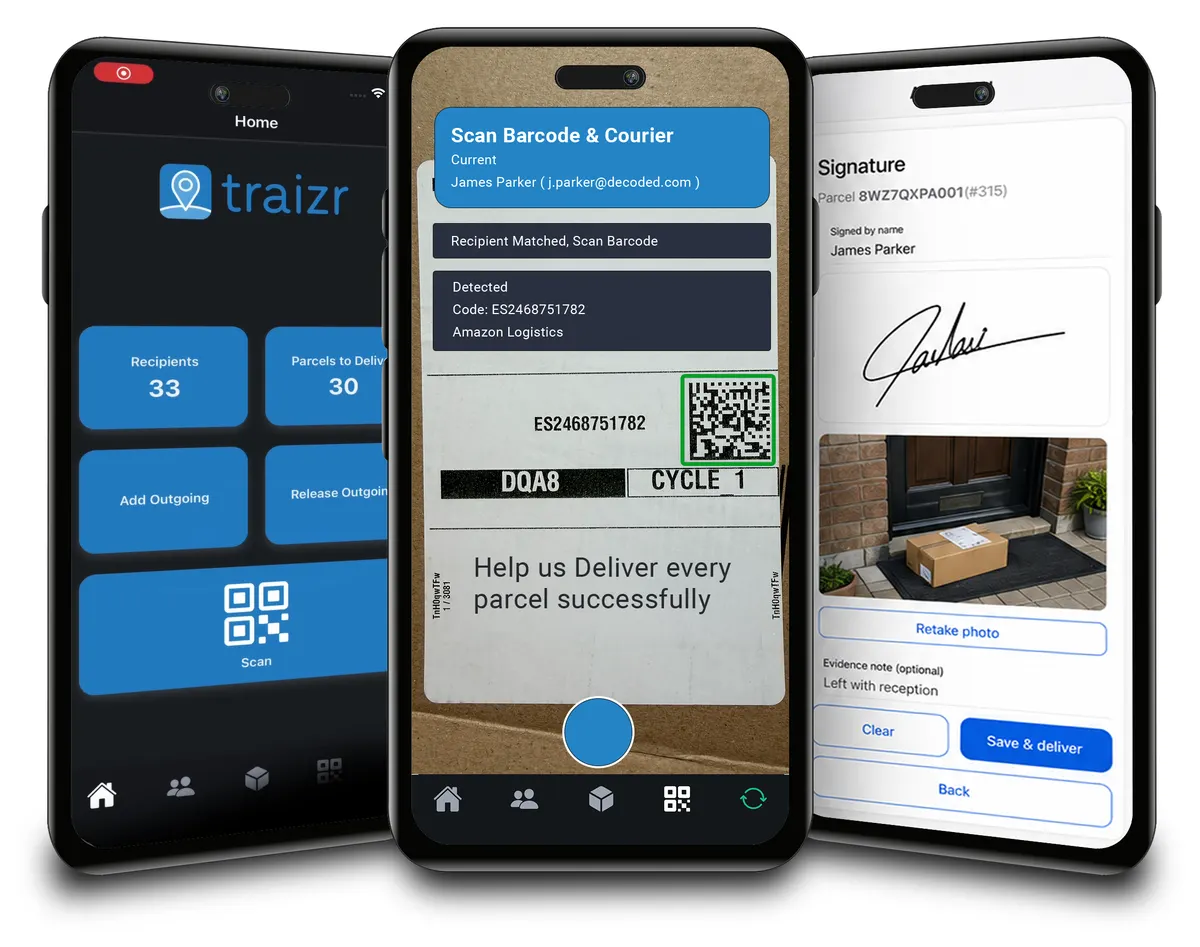
Staff scan the shipping label on a phone or tablet. Traizr reads the recipient and reference details from the label automatically, and a photograph of the item can be captured at the same moment.
Traizr matches the recipient
The item is matched against your recipient list.
The recipient is notified
An automatic notification goes out by email or SMS, telling them what has arrived and where to collect it.
Every internal movement is recorded
Moving it to a department, another floor or another building is another scan. Each hop is added to the same record.
It is collected with proof
Handover is confirmed with a QR code, a digital signature or a photograph, timestamped against the item. For hand delivery, notes and GPS location can be captured too.
The history stays searchable
The complete sequence remains available afterwards, searchable by recipient, sender, reference or date, and exportable when somebody needs it in a report.
Chain of custody
Every hand the item passes through
A tracking number tells you an item exists. A chain of custody tells you who has been responsible for it at every moment since, and what evidence exists for each of those moments.
-
It arrives
The item is scanned at the point it enters the building, by a named member of staff, at a recorded time.
CapturedWho received it, the exact time, the courier, the barcode, and a photograph of the item as it arrived. -
It is matched to a person
Traizr ties the item to a recipient on your list, with their location, so it is no longer an anonymous box on a shelf.
CapturedThe recipient, their room, unit or department, and any notes or tags added at receipt. -
The recipient is told
A notification goes out immediately, and reminders follow if the item is not collected.
CapturedWhen the recipient was notified, and when each reminder was sent. -
It is held somewhere specific
The item sits against a named postroom or location, not "reception, probably". That is what makes the question "where is it now" answerable from a desk.
CapturedThe current status and the postroom or location holding it, with the time it has been waiting. -
Somebody moves it
A transfer to a department, another floor or another building is scanned as it happens, by the person doing it. If the item has further to go, how each hop is routed is set by your own rules.
CapturedWho moved it, where from, where to, and when. Each hop is added rather than replacing the last. -
It changes hands internally
Where an item passes between teams before it reaches its recipient, each handover is its own recorded event with a person on either side of it.
CapturedThe accepting person, the time, and any photograph or note taken at the handover. -
It is collected
The recipient confirms collection with a QR code from their own app, a signature on the device, or a photograph at the point of handover.
CapturedWho collected it, when, and which form of proof was taken. For hand delivery, notes and GPS location as well. -
The record stays
Nothing is thrown away when the item is closed. The sequence remains searchable and exportable for as long as you need it.
CapturedThe complete history, searchable by recipient, sender, reference or date, and available in exportable reports.
The point? An investigation becomes a search rather than an interview. For the wider picture, see chain of custody software, and for what the record looks like when somebody asks for it, the mailroom audit trail and internal proof of delivery.
What the platform actually does
Everything below is included as standard. There are no feature tiers and no per-user fees.
-
Mobile scanning
Barcode and QR scanning on any iOS or Android phone or tablet. No dedicated scanners, no on-site servers, nothing to install.
-
Label and photo capture
Photograph the item as it arrives, and read sender, recipient and reference details off the label automatically instead of typing them.
-
Recipient matching
Items are matched against your recipient list, imported by CSV or kept current automatically through a connector.
-
Automatic notifications
Email, mobile push and SMS alerts on arrival, when ready to collect and once collected, with automatic reminders for anything left waiting.
-
Multi-hop movements
Transfers between people, postrooms, floors, buildings and sites are recorded as separate events on one continuous record.
-
Current location and status
Each item shows the postroom holding it and where it has reached, so the dashboard answers where something is without a walk to the shelf.
-
QR code collection
Recipients confirm collection from their own app with a QR code, which keeps the queue moving and puts the proof in the right hands.
-
Signatures and evidence
Digital signature, photograph, notes and GPS location at the point of handover, timestamped and stored against the item.
-
Searchable audit trail
Find any item in seconds by recipient, sender, reference or date, and read its full history rather than a single status.
-
Reporting and analytics
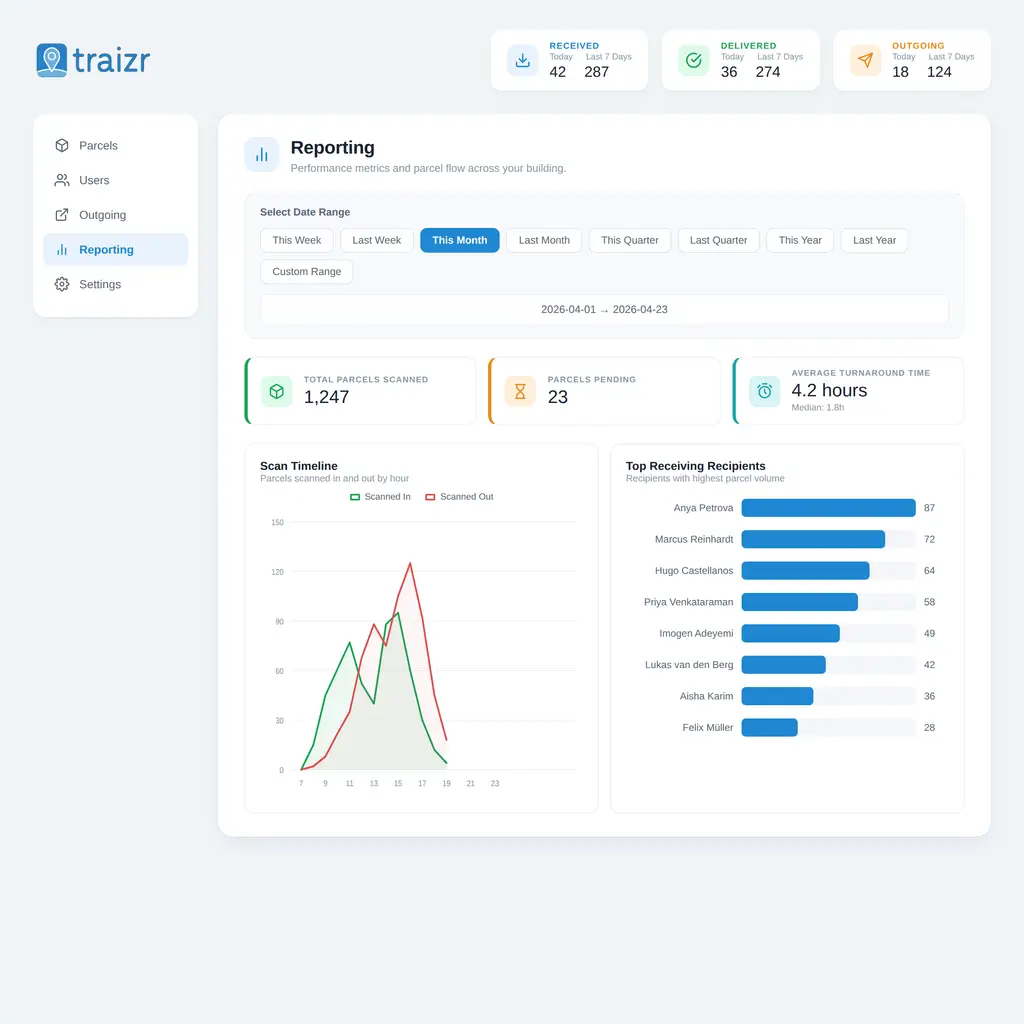
Volumes, pending items, average turnaround, scan activity by hour and the recipients receiving most. All exportable.
-
Multi-site management
Every building on one dashboard, configured individually, so a portfolio runs one way without running one system per site.
-
Works without internet
Keep processing deliveries during an outage. Items queue on the device and sync automatically when the connection returns.
What you can track with it
Parcels and packages are the bulk of it. In practice, anything that arrives, gets held and has to reach a named person ends up on the same record.
Inbound package tracking, from the courier handover onwards
Inbound package tracking is the first half of what this page describes. The courier's own tracking ends the moment somebody at your building signs for the delivery. Inbound tracking picks the item up at that signature and follows it until it reaches the person it was addressed to.
In practice that means every item that arrives is scanned at the door, matched to a recipient and given a record with a time and a name against it. Where the courier issued a tracking number, Traizr stores it alongside the internal record, so a question about a late delivery can be answered from one screen instead of three.
Inbound package tracking software is not a separate system here. It is the arrival step of the internal tracking described above, which is why the record created at the door is the same record that proves collection later.
Package receiving at the desk
Package receiving is the part your reception or postroom staff actually do: accept the item, log it, and put it somewhere it can be found again. It is the step most often still done on paper, and the step that decides whether anything after it can be trusted.
Traizr records who accepted each item, when it was accepted and where it was put, from a phone or a tablet at the desk. Recipients are notified automatically, so nobody has to chase, and the shelf or bay is recorded rather than remembered. Items that have been sitting too long show up in the ageing report before anyone has to ask.
Package receiving software is sometimes bought on its own. On Traizr it is one end of the same audit trail, so what the desk records on arrival is what the signature or photo at collection is checked against.
What this looks like in different buildings
The software is the same. The problem it is solving is not.
-
Corporate offices
Personal deliveries have merged with business post, and reception is holding both. Tracking separates what is waiting from what has gone.
Office mailroom software -
Universities
Volume arrives in bursts around term dates, across a campus of separate buildings, for a recipient list that changes every year.
University mailroom software -
Student accommodation
Hundreds of residents, high turnover and a September peak that overwhelms any manual process within a week.
Student accommodation parcels -
Hospitals
Items are time sensitive and often clinical, moving between wards and departments where the handover has to be recorded, not assumed.
Hospital parcel tracking -
Government
Correspondence that has to be accounted for, in an environment where "we think it was delivered" is not an acceptable answer.
Government mailroom software -
Legal firms
Served documents and originals where the custody record matters more than the delivery, and deadlines hang on it.
Law firm mailroom software -
Coworking spaces
One address, many companies. Post has to reach the right tenant, and each tenant needs their own view of it.
Coworking mailroom software -
Multi-site organisations
Items that move between buildings, and a head office that needs the portfolio on one screen rather than eight spreadsheets.
Multi-site mailroom management
Manual tracking against Traizr
Not a list of things a logbook cannot do. A list of the questions each approach can answer when somebody asks.
| Manual tracking | With Traizr |
|---|---|
| Paper log or spreadsheet | One central digital record per item |
| Unclear where an item is now | Current status and the postroom holding it |
| Somebody remembers to email the recipient | Automatic notifications, with reminders that chase |
| No proof of handover | QR code, signature or photograph, timestamped |
| Internal moves go unrecorded | Every hop scanned and added to the same record |
| Investigations mean asking people | Searchable history by recipient, sender, reference or date |
| Each site keeps its own version | Every building visible on one dashboard |
| No idea how long anything takes | Volumes, turnaround times and pending items, exportable |
Security, audit and accountability
What your IT and procurement teams will ask
- Role-based access. Each user sees and does only what their role requires, and administrative access is controlled by role.
- Multi-factor authentication. Enforced for privileged access, with six-digit PIN and biometric login supported on mobile.
- UK or EU data residency as standard. Hosted on dedicated servers in co-located data centres, within UK and EU facilities that hold ISO 27001 certification. US or Asia residency available on request.
- Encrypted in transit, backed up off-server. HTTPS with TLS throughout, and encrypted backups stored separately from production.
- Documentation on request. The data processing agreement, security overview, incident response plan and assessment summary are sent on request.
Fitting it to what you already run
Internal tracking works best with a current recipient list. Somebody moved office in November, a student withdrew in week three, three hundred residents arrived in a fortnight. Let us help you to manage your recipient list by creating a link between Traizr and software you already use.
Traizr can read user lists and their locations directly from the system you already maintain, on a schedule. Recipient lists can also be imported by CSV or spreadsheet, brought in over SFTP, or pulled through the API, and Traizr connects to HR, access management and facilities systems.
The connectors are read-only. Traizr reads the records it needs and never writes back into your student, property or business system. See the full list of integrations for what is available today.
Frequently asked questions
Everything you need to know before getting in touch.
What is internal package tracking software?
It is software that tracks an item after it has entered your organisation. Courier tracking ends the moment a driver hands a parcel to reception. Internal package tracking software starts there: the item is logged on arrival, matched to a named recipient, followed through every internal handover, and closed off with proof of collection. The result is one record showing where an item is now and everywhere it has been.
How does internal parcel tracking work in practice?
Someone scans the label on arrival using a phone or tablet. Traizr reads the details, matches the item to a recipient and notifies them automatically. Each subsequent movement is another scan, so the record builds itself as the item travels. At handover the collector confirms with a QR code, a signature or a photo, and the item is closed.
Can Traizr track items between departments or locations?
Yes. Multi-hop tracking records each handover as the item moves between people, postrooms, floors, buildings and sites, and every hop is kept on the same record rather than starting a new one.
Can recipients be notified automatically?
Yes. Recipients are alerted when an item has arrived, when it is ready to collect and when it has been picked up, by email, mobile push or SMS. Notification content is configurable, and automatic reminders chase anyone who has not collected so nothing sits at reception indefinitely.
What proof of collection can be captured?
A QR code scanned by the recipient, a digital signature, or a photograph, timestamped and stored against the item. For items delivered by hand, Traizr can also capture notes and GPS location at the point of handover.
Can Traizr track packages across several buildings or sites?
Yes. Every site is visible from a single dashboard, with configuration set per building, so a portfolio can run consistent workflows without separate systems. See multi-site mailroom management for how that works day to day.
Does Traizr require dedicated scanning hardware?
No. Traizr runs on any iOS or Android smartphone or tablet, and the admin platform works in any web browser. There is nothing to buy, nothing to install on site and no specialist scanner to maintain.
Can staff use phones or tablets?
Yes, and that is the intended way to use it. Staff scan barcodes, capture photographs and take signatures on the device already in their pocket. If the connection drops, items queue on the device and sync automatically once it returns.
Can the system show the current location of a package?
Yes. Each item carries its current status and the postroom or location it is held in, alongside the timestamps for when it arrived and when it was collected, so the parcels dashboard answers "where is it now" without anyone walking to a shelf to look.
How is the full chain of custody recorded?
Every event is written to the item as it happens: who received it and when, who it was matched to, when the recipient was notified, where it was stored, who moved it, each handover, who collected it and what proof was captured. The history is searchable by recipient, sender, reference or date, and reports are exportable. For the detail behind this, see chain of custody software and the mailroom audit trail.
Related pages
-
Mailroom management software
What the software has to do, what to ask a vendor, and how Traizr compares. The page to start on if you are buying.
Read the page -
Digital mailroom
What a digital mailroom is, how to set one up, and how to measure whether it is working.
Read the page -
Package room software
Record where every parcel is shelved, notify recipients automatically and keep the room turning over.
Read the page
Ready to Simplify Your Building?
See how Traizr improves internal package tracking in a building like yours. Bring a real scenario and we will walk the whole item journey, from the scan at the door to the signature at collection. About 20 minutes.