
Guide
Virtual Office Management: A Complete Guide for Mail and Business Centres
A practical guide to running the mail side of a virtual office service, written for business centres, coworking operators and mailbox providers. It covers the daily process, the policies to set before you need them, the figures to record, and how operators price the work.
A virtual office service is a set of daily tasks carried out for clients who are not in the building. This guide covers how to run those tasks consistently as the client list grows.
This page is about running the service. If you are choosing a system, virtual office software covers what the software does and what to ask a vendor.
- Process, not product
- Includes pricing models
- Policies to write down
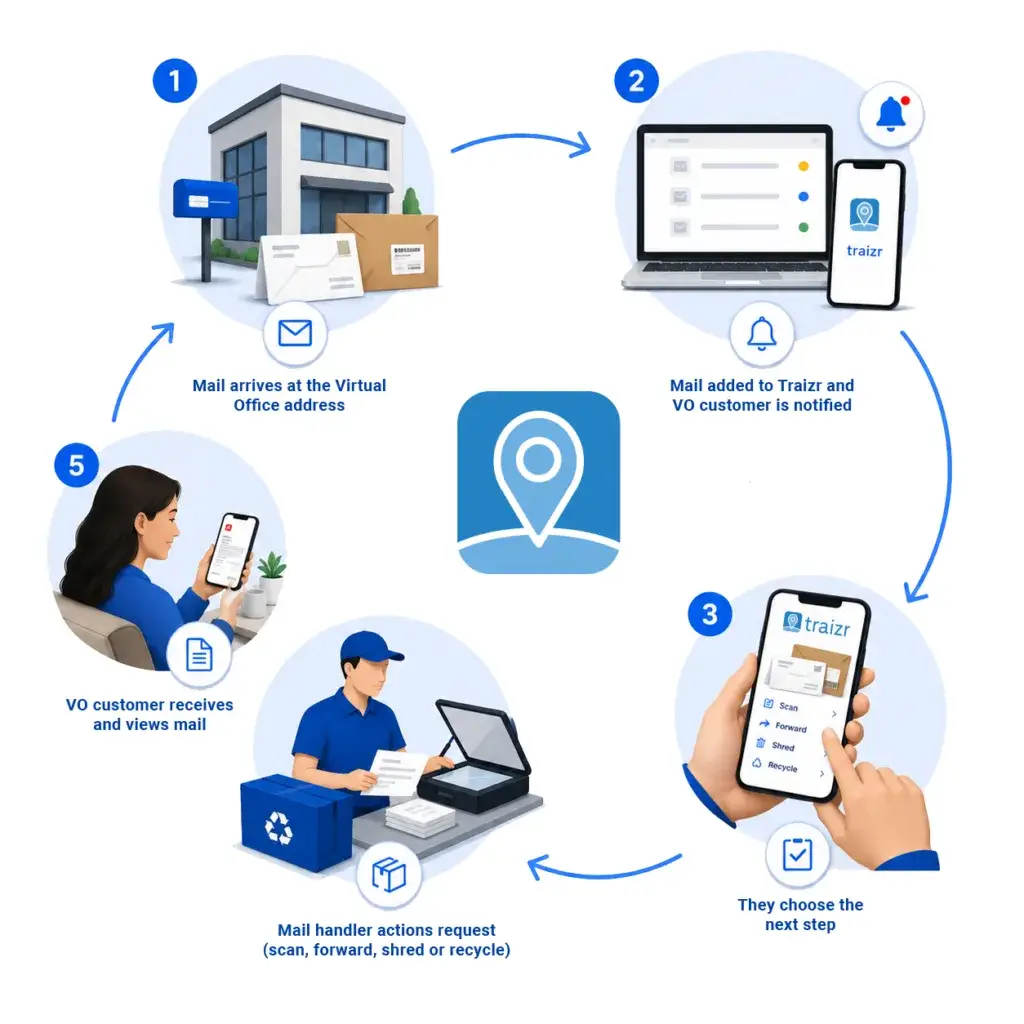
What is involved in running a Virtual Office
A virtual office service is a set of daily tasks carried out for clients who are not in the building.
When a client buys a virtual office, they use your address as their business address and rely on you to deal with whatever arrives there. The work breaks down into four repeated tasks: receive and log each item, tell the client it has arrived, carry out their instruction, and keep a record of what was done.
None of these tasks is difficult on its own. The difficulty is doing all four consistently, every working day, for every client, as the client list grows. Most operators start informally, with a spreadsheet or a shared inbox, and find that this works well enough up to a few dozen clients.
Past that point, the cost of an informal process is time spent answering questions. A client who cannot see what has arrived emails to ask. A client who is not sure whether an item was forwarded asks you to check. A client who queries an invoice asks you to show where the charges came from. Each question usually takes longer to answer than the original task took to do.
The rest of this guide is about setting the service up so those questions rarely need asking: clients can see what has arrived, every action is recorded, and invoices are built from recorded usage rather than memory.
This page covers how to run the service. If you are choosing a system to run it on, virtual office software covers that side separately.
The process
The daily loop, and who does each part
The core process is six steps, repeated for every item that arrives.
Receive and sort
Post usually arrives in one or two batches a day. Sort it by client before doing anything else, because every later step is carried out per client, and unsorted post has to be handled twice. This step is always done by a person; no software can do it for you.
Log it with a photograph
Photograph the envelope while it is still sealed and log it against the client. The sender's name is usually printed on the outside, so the client can decide what to do with the item without you opening it and without emailing you to ask what it is.
Notify the client
Tell the client as soon as the item is logged, not in an end-of-day summary. Finding out quickly is a large part of what the client is paying for. This step should be automated, because staff will not reliably send hundreds of individual notifications by hand.
Wait for the instruction
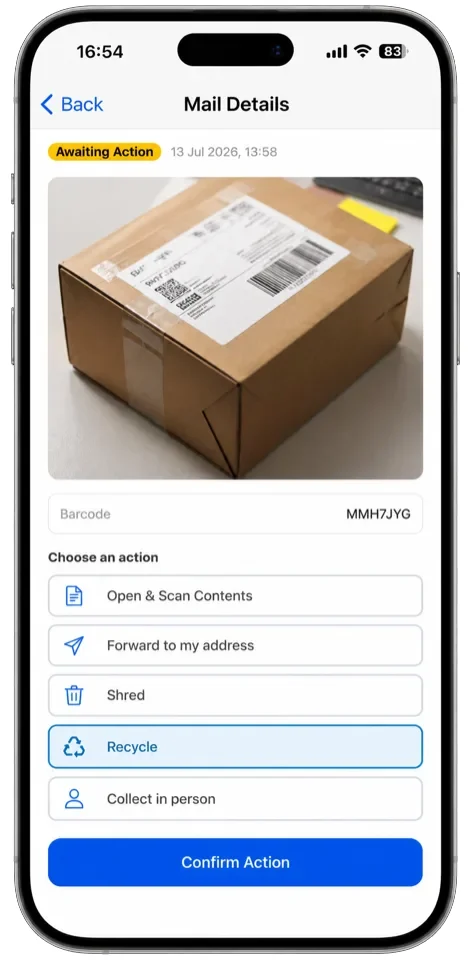
The client chooses one of five actions: scan, forward, shred, recycle or collect in person. Record the instruction against the item itself, not in a separate email that someone has to match up later. Instructions that arrive separately and never get matched to an item are the most common cause of lost and delayed post in a manual process.
Carry it out and record it
Do the work, then record what was done, by whom and when. Scanning and forwarding are the two chargeable actions, so this record is also the basis of the client's bill.
Deal with what nobody answered
Some items never receive an instruction. Set a holding period, review unanswered items on a schedule, and apply your policy when the period runs out. This step has no software equivalent: someone has to look at the list and act on it, and it is the step operators skip most often.
Decisions
Good-to-have policies for your organisation
Each of these situations will come up eventually, so decide your answer in advance and put it in your terms.
-
How long you hold unanswered mail
Some clients respond slowly and a few never respond at all. Set a holding period, write it into your terms, and apply it to every client in the same way. The exact length matters less than having one, because without a written period staff have no authority to act and the unanswered pile keeps growing.
Add to PolicyThe holding period, how many reminders go out during it, and exactly what happens at the end. -
What happens when a client leaves
Post keeps arriving after an account closes, sometimes for years. Decide how long you will forward it, what happens after that, usually return to sender, and whether you charge for the forwarding period. Put this in the contract at sign-up, because it is much harder to agree once the client has already left.
Add to PolicyA forwarding window, what happens after it expires, and who bears the cost. -
What you will and will not accept
Decide your position on parcels, signed-for items, perishables and oversized items before the first one arrives. Each takes more space than letter post, and some carry liability if they are damaged or lost while in your care. State in your terms what you accept, where accepted items are stored, and what you charge for holding them.
Add to PolicyAccepted item types, size and weight limits, storage arrangements and any additional charges. -
Who you will take on as a client
Providing a business address usually brings obligations to verify who your client is. The requirements differ by jurisdiction and change over time, so ask your own advisers what applies where you operate. Whatever the requirements are, build the checks into onboarding so no client starts using the address before the checks are complete.
CheckThe current requirements where you operate, with your own advisers. They differ by country and they change. -
Whether you offer registered office use
Some clients will ask to use your address as their registered office. This is usually possible, but it carries extra obligations, particularly around how quickly official correspondence must be passed on. Treat it as a separate service with its own terms and its own price, and confirm the current requirements with your advisers before offering it.
CheckThe conditions in your jurisdiction, and price it separately from ordinary mail handling. -
How you handle disposal
Shredding and recycling are different instructions and should be treated differently. Recycling is for items the client does not want and that carry no personal information. Anything showing a name, address or account number should be shredded, and only on a recorded client instruction, never on a judgement call made by staff on the day.
Write downWhich disposal method applies to what, and that destruction happens only on a recorded client instruction.
Not legal advice. Rules on address services, identity checks and registered office use differ by jurisdiction and change over time, so check your own position with your own advisers.
The numbers to record
-
Items received per client
The base figure. It shows which clients receive far more than their plan assumes, and it is the first thing to check when an account looks unprofitable.
-
Scans carried out
Scanning is chargeable and labour intensive, because someone opens, scans and files each item by hand. Count scans as they are done rather than estimating them at month end.
-
Forwards sent
A forward has two costs: your handling and the postage. Record them separately, because handling is your labour and postage is a pass-through cost.
-
Postage per client
Record postage against the client at the moment the item is sent. If it is not captured then, it usually ends up absorbed as a general overhead and never billed.
-
Time to instruction
How long items wait for the client to respond. If this figure is consistently high across many clients, your notifications are probably not reaching people.
-
Time to action
How long items wait for your team after the instruction arrives. This is the figure clients notice, and the one to watch when you take on more clients without adding staff.
-
Items with no instruction
The size of the unanswered pile. It is a storage cost and a risk at the same time, so track it and apply your holding policy on schedule.
-
Volume by month
Mail volume is seasonal, and the pattern differs between client types. A full year of monthly figures tells you when the peaks come and how to staff for them.
Three ways operators price this
All three models work, and the right one depends on how varied your clients' mail volumes are.
-
A flat monthly fee
One price covers the address and a set level of handling. It is simple to sell and simple to bill, and it suits a client base with low, similar volumes. The risk is the heavy user whose mail costs more to handle than they pay. If you use this model, record usage anyway, so you can see which accounts have outgrown the price and move them to different terms at renewal.
Best forClient bases with low, similar mail volumes. -
A base fee plus per-item charges
A lower monthly fee covers the address, and each scan and forward is charged individually. Revenue matches the work, so no client is unprofitable, and the model suits a varied client base. It only works if every chargeable action is recorded when it happens, because a per-item invoice has to be able to show the items behind it.
Best forVaried client bases, where volumes differ widely between clients. -
Tiered plans with allowances
Two or three plans, each with a monthly allowance of items or scans, with per-item charges beyond the allowance. This is the middle ground: predictable for the client, protected for you. Set the tier boundaries from your own usage data rather than a competitor's price list, because their client mix is not yours.
Best forOperators with a year of usage data to set the tier boundaries from.
Whichever model you choose, keep postage out of the bundled price. Postage varies with destination and weight, and it changes whenever a client's circumstances change. Charge it as a pass-through, recorded against the client when the item is sent.
The mistakes that show up again and again
These come up in conversations with operators replacing a manual process, and most are decisions that were never made rather than work done badly.
- Opening mail without an instructionStaff open an item to be helpful, then find the client wanted it forwarded unopened. Photograph the sealed envelope, let the client decide, and open only what the client has asked to have scanned.
- Notifying clients in batchesAn end-of-day digest feels efficient, but the client is paying to hear quickly. Slow notification is one of the most common reasons clients give for moving to another provider.
- Taking instructions on any channelInstructions that arrive by email, text or in passing have to be matched to an item by hand. Record the instruction against the item instead.
- Absorbing postagePostage that is not recorded at the point of sending is rarely billed. Across a year it becomes a significant cost that no single invoice ever shows.
- Letting the unanswered pile growWithout a written holding period, nobody feels able to dispose of anything, and unclaimed post accumulates until it becomes a physical problem. Set the period, put it in your terms, and clear the pile on schedule.
- Having no leaver processThe account closes, the post keeps arriving, and the contract says nothing about what happens next. Decide the forwarding period and what follows it before the client signs, not after they have gone.
- Pricing without usage dataOperators who measure per-client volume for the first time usually find that a small number of accounts take most of the handling time. Until you record usage, you cannot know which clients your prices are wrong for.
- Running a second address as a separate operationOperators who open a second site often duplicate the whole process instead of running one process across both. Business address management covers keeping one record across all of them.
Frequently asked questions
Everything you need to know before getting in touch.
What does virtual office management actually involve?
Four repeated tasks: receive and log incoming mail, notify the client, carry out their instruction, and keep a record of what was done. Around the daily work, you also need written policies for holding periods, leavers and disposal, and recorded usage figures to bill from. The difficulty is doing it consistently at scale, not any single task.
How is a virtual office different from a PO box?
A PO box stores post until someone collects it, while a virtual office acts on the post on the client's instruction. That means a virtual office needs a way to notify clients, take instructions and record what was done, whereas a PO box needs storage and a collection process. Many operators run both; PO box management covers the collection side.
How much should we charge?
That depends on your market, but you cannot set a sensible price until you know what each client actually sends you. Record items, scans, forwards and postage per client for a few months first. Most operators find the spread between their lightest and heaviest clients is much wider than their pricing assumes.
How long should we hold mail a client has not responded to?
Set a fixed holding period, write it into your terms, and apply it to every client. The exact length matters less than having one, because a written period is what gives staff the authority to act. Decide it now rather than when the pile has already become a problem.
What do we do about post for clients who have left?
Follow what your contract says, which is why the contract needs to cover it. The usual approach is a defined forwarding period followed by return to sender. Agree it at sign-up, because a client is much harder to reach after they have gone.
Do we need to open mail in order to scan it?
Yes, scanning always means opening the item. That is why scanning should only happen on a client instruction, never as a default. Photographing the sealed envelope lets the client decide from the outside, so you open only what they have asked you to open.
What about identity checks on clients?
Providing a business address usually brings obligations to verify who your client is, and the requirements differ by jurisdiction and change over time. Ask your own advisers what applies where you operate. Whatever applies, run the checks during onboarding, before the client starts using the address.
Can a client use our address as their registered office?
Often yes, but it is not automatic and it carries extra obligations, particularly around passing on official correspondence quickly. Offer it as a separate service with its own terms and its own price. Confirm the current requirements with your advisers before you offer it.
How many clients can one member of staff handle?
It depends more on the process than the person. A team that photographs and logs items on arrival, and takes instructions against each item, handles several times the volume of a team working from a notebook and a shared inbox. The difference is the time not spent answering questions about what arrived and what happened to it.
What software do we need to run this?
Something that logs each item with a photograph, notifies the client, records their instruction against the item, and keeps a record of what was done and by whom. It should also record the usage figures your invoices are built from. Virtual office software covers this in detail.
Where to go next
The software side of this guide, and the neighbouring problems operators tend to run into at the same time.
-
Virtual office software
Run a virtual office or business centre address: photograph every item, act on client instructions, and bill for what you handled.
Read the page -
Virtual mailbox software
Create and number mailboxes, give each client their own inbox, and keep the full history of every item handled.
Read the page -
Mail scanning software
Items are opened and scanned only when the client asks, and the scan is stored on the item record.
Read the page -
Mail forwarding software
Forward items to the address the client chooses, and record the carrier and postage against their account.
Read the page -
Business address management
Record which client is registered at each address, and manage their mail across every location you run.
Read the page -
Mailroom management software
What the software has to do, what to ask a vendor, and how Traizr compares. The page to start on if you are buying.
Read the page -
Internal package tracking software
Follow an item through every hop inside your buildings, with a scan at each handover and a record of who held it.
Read the page
Ready to Simplify Your Building?
Bring your actual client list and the way you bill for it, and we will walk an item from the doormat to a closed instruction. About 20 minutes.