Self-service collection
Parcel Self-Collection Kiosk on an iPad or Android Tablet
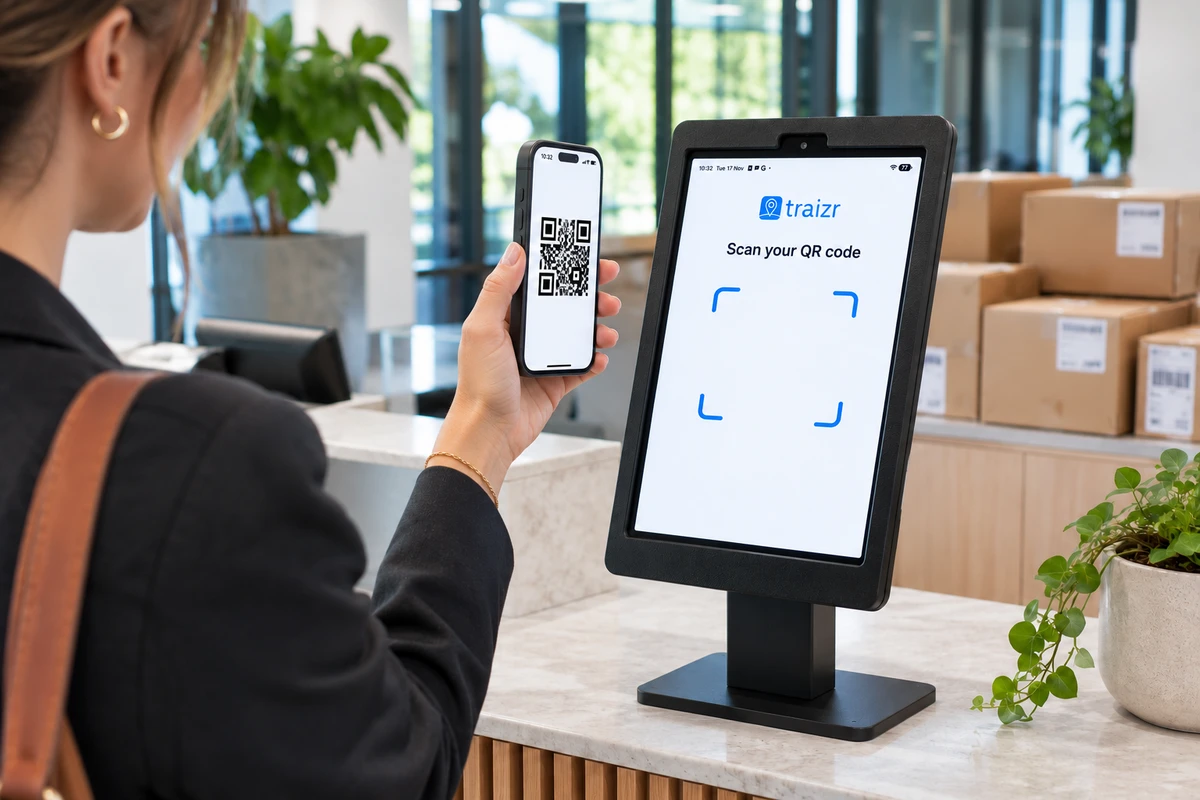
Turn an iPad or Android tablet into a collection point. Recipients scan the QR code from their arrival email, take their parcels and confirm on screen.
Every collection is recorded on the parcel, the same as a handover at a staffed desk.
- Scan the QR code from the email
- iPad or Android tablet
- No staff login on the tablet
What the self-collection kiosk does
Reception is often the busiest place in the building, and much of that time goes on routine handovers. Someone comes to the desk, gives their name, waits while a member of staff finds the parcel and signs for it.
The self-collection kiosk lets people do that themselves. A tablet at the collection point runs the standard Traizr app in kiosk mode. The recipient scans the QR code from their arrival email, sees the parcels waiting for them, takes them and taps to confirm.
The parcel is marked collected, the history shows when and at which kiosk, and the recipient gets the usual "collected" email. Staff are free for the deliveries and questions that need a person.
Running a parcel room? Package room software covers shelf locations, capacity and ageing parcels. The kiosk is one way to hand those parcels over.
How it works
From arrival email to collected in three steps
The recipient already has everything they need: the QR code in the email that told them their parcel had arrived.
Scan the QR code
The recipient holds the QR code from their arrival email up to the tablet. A code for a parcel that has already been collected is rejected.
See and take the parcels
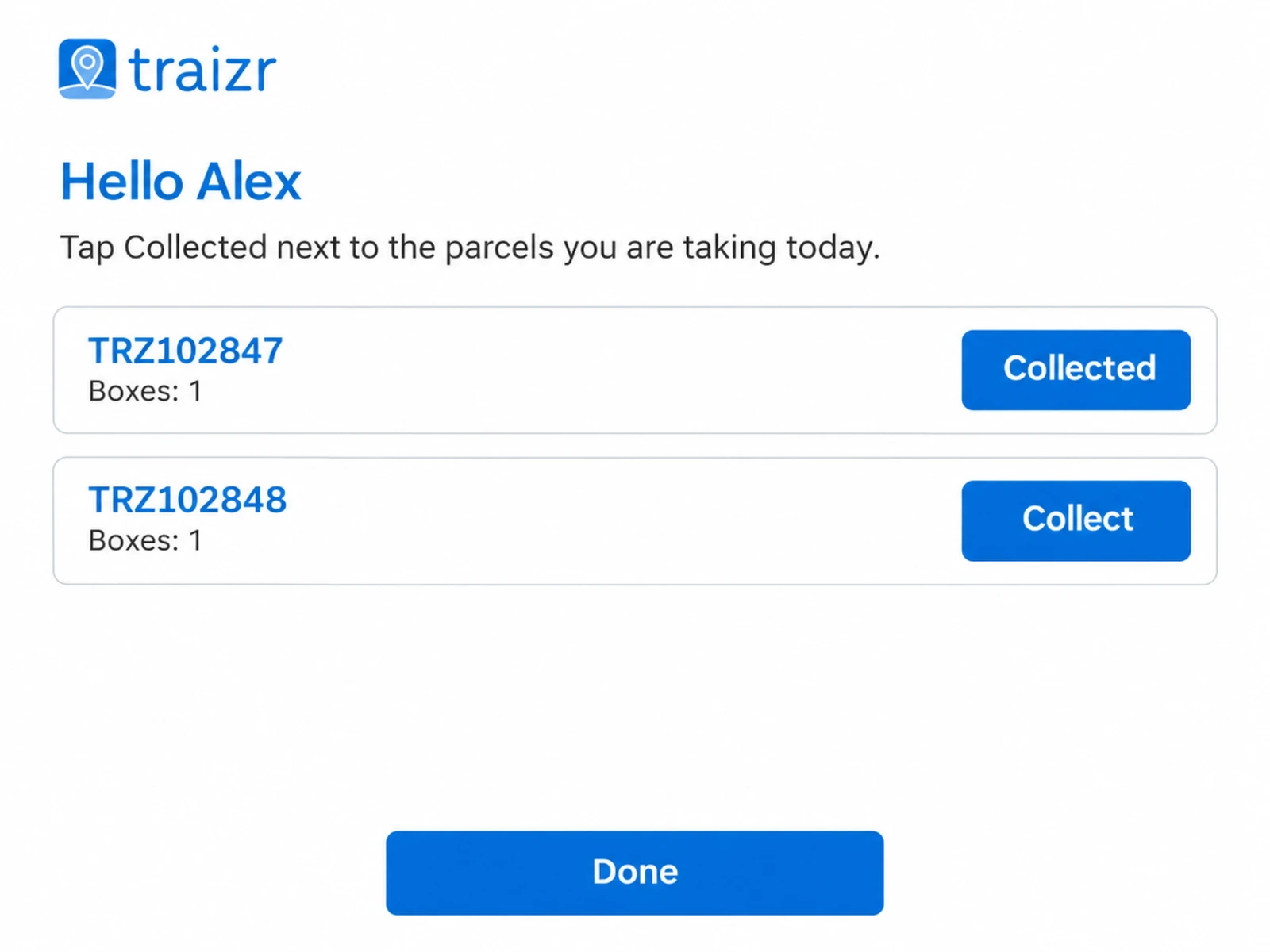
The tablet shows the parcels waiting for that person. They take them from the collection point.
Confirm on screen
The recipient taps to confirm, and signs if that kiosk asks for a signature. They can undo during the visit, and the "collected" email is sent when the visit ends.
People who do not have a QR code are asked to go to reception, so nobody is left at the tablet without a way to get their parcel.
Built for an unattended collection point
A tablet that nobody is watching needs different rules from a phone in a staff member's hand.
No staff login on the tablet
Each kiosk tablet is paired to your organisation as a device. It never signs in as a member of staff, so nobody at the tablet can search the recipient list or see anyone else's parcels.
Settings for each kiosk
Run as many tablets as you need. Each one has its own name, location and settings, including whether a signature is required.
A kiosk in a staffed lobby might take a tap to confirm. One in a quieter room might ask for a signature as well.
Every tablet visible to admins
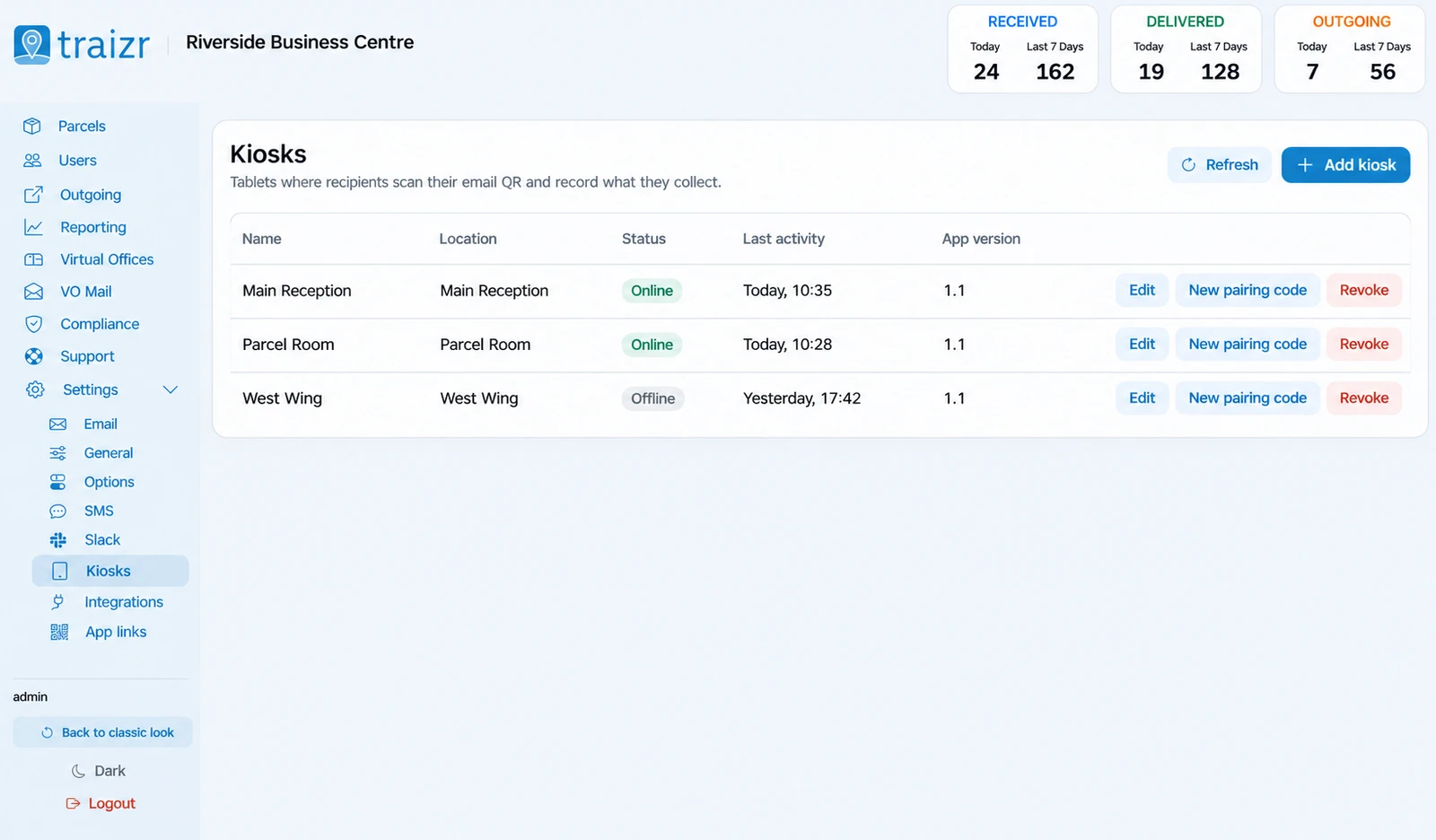
The admin dashboard lists your kiosk tablets with the last activity on each. If a tablet is lost or moved, an admin can revoke it at once.
The same record as a staffed handover
A kiosk collection goes on the parcel's history like any other handover, so proof of delivery and reporting cover both.
What the kiosk gives you
Part of the Traizr app your team already uses. Switched on for your organisation on request.
-
Any iPad or Android tablet
The kiosk runs in the standard Traizr app. No extra hardware to buy.
-
QR code from the arrival email
Recipients use the code they already have. Nothing new to issue.
-
Collected codes rejected
A QR code for a parcel that has already been collected will not work again.
-
Signature if you want one
Require a signature at some kiosks and not others.
-
Undo during the visit
A recipient who taps the wrong thing can put it right before they leave.
-
Collected email when done
The confirmation goes out when the visit ends, not after every tap.
-
No staff login
Device pairing keeps the recipient list off the tablet.
-
Several kiosks
Each with its own name, location and settings.
-
Revoke at once
Admins see each tablet's last activity and can switch one off immediately.
Where kiosks help
Anywhere that people collect parcels in numbers and reception has other work to do.
-
Student accommodation
Term starts bring parcel peaks. Students collect from a tablet instead of queueing at the desk.
Student accommodation software -
Universities
Departments and halls offer a collection point that does not need a member of staff for every handover.
University mailroom software -
Apartment buildings
Residents collect from the lobby tablet, and the concierge deals with everything else.
Apartment package management -
Coworking and multi-tenant buildings
Members collect their own parcels, and every collection still goes on the record.
Multi-tenant mailroom software -
Corporate offices
Staff collect on their way in, and the mailroom has a record of every collection.
Corporate headquarters mailroom -
Parcel rooms
Pair a kiosk with recorded shelf locations so people go straight to the right shelf.
Package room software
Frequently asked questions
Everything you need to know before getting in touch.
What is a parcel self-collection kiosk?
It is a tablet at a collection point where recipients collect their own parcels. In Traizr, the recipient scans the QR code from their arrival email, sees their parcels, takes them and confirms on screen. The collection is recorded on the parcel.
What hardware do we need?
An iPad or an Android tablet. The kiosk runs in the standard Traizr app, so there is no special hardware to buy.
Can someone collect a parcel twice, or someone else's parcel?
A QR code for a parcel that has already been collected is rejected. The tablet only shows the parcels linked to the QR code that was scanned, and it never signs in as a member of staff, so the recipient list is not visible at the tablet.
Can we require a signature?
Yes. Each kiosk has its own settings, including whether a signature is required.
What happens if someone does not have their QR code?
The kiosk directs them to reception, where staff can hand the parcel over in the usual way.
How many kiosks can we run?
As many as you need. Each tablet has its own name, location and settings, and admins can see the last activity on each one and revoke a tablet at once.
Is the kiosk an extra cost?
No. It is included, and switched on for your organisation on request.
Other things the platform does
Same system, different capability.
-
Multi-tenant mailroom software
Many tenants on one platform, each seeing only their own mail, with a superadmin that creates and configures all of them.
Read the page -
On-premise mailroom software
Install on your own infrastructure or in a container inside your network, and run the mailroom with no outbound connection at all.
Read the page -
SMS and Slack notifications
Reach people on the channel they actually read. Text messages for those without a work inbox, Slack for the teams already in it.
Read the page -
Multi-hop mail routing
Send an item onward through postrooms, buildings, campuses and countries, with one person accountable for each leg.
Read the page -
In-app support from real people
Ask a question from inside the product and get an answer from someone who knows it, not a ticket number and a queue.
Read the page -
Smart parcel label scanning
Scan any barcode on a courier label and Traizr finds the parcel, reads the recipient's name and records the box count and PO number.
Read the page -
Request Open and Scan
Staff who are away from the office ask for an item to be opened and scanned from their arrival email. The scan is emailed to them and not kept by Traizr.
Read the page -
Collection and delivery requests
A branded web form for booking a parcel collection or an internal delivery. No login needed, and every request gets a reference number.
Read the page -
Package room software
Record where every parcel is shelved, notify recipients automatically and keep the room turning over.
Read the page
Ready to Simplify Your Building?
We will show you a collection at the kiosk from QR scan to the "collected" email. About 20 minutes.