

Microsoft Entra ID Single Sign-On and SCIM Provisioning
Sign in with Microsoft Entra ID, and provision users automatically with SCIM 2.0.
- Microsoft work account sign-in
- Limit by Microsoft 365 group
- SCIM 2.0 provisioning
Staff sign in to Traizr with the Microsoft account they already use, and your IT team controls who has access from Microsoft Entra ID (formerly Azure AD). With SCIM provisioning, new starters, changes and leavers reach Traizr without anyone updating it by hand.
When a mailroom system has its own passwords, it becomes one more account for IT to create, reset and remember to remove. Staff reuse passwords, leavers keep access longer than they should, and the security review asks questions that are hard to answer.
Single sign-on puts Traizr behind the sign-in your organisation already manages. Admins sign in to the admin dashboard with their Microsoft work account, and mailroom staff can sign in to the Traizr app with Microsoft too. Your Conditional Access policies, including multi-factor authentication, apply to every Microsoft sign-in.
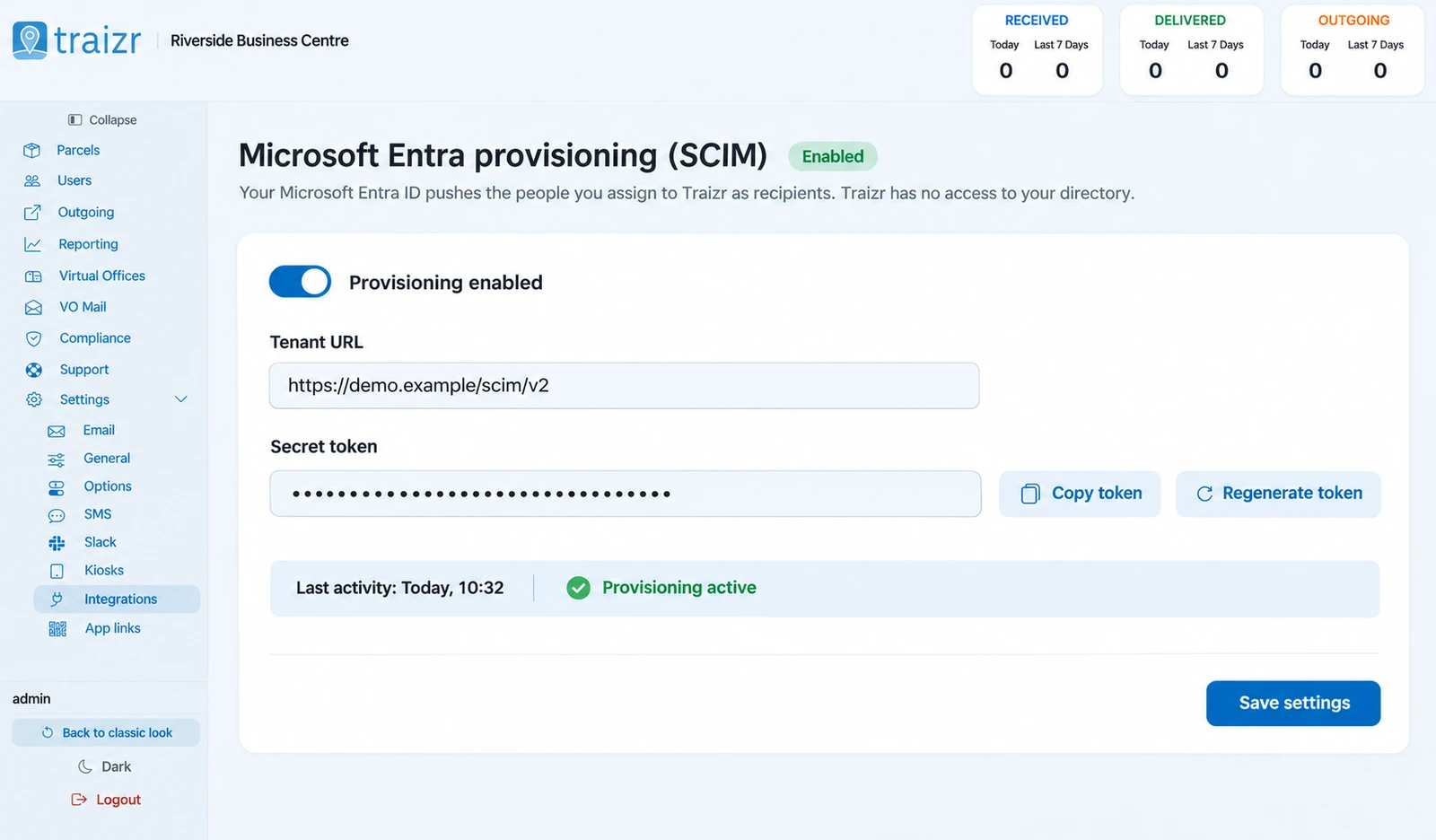
SCIM provisioning handles the other half: who exists in Traizr at all. Microsoft Entra ID sends starters, changes and leavers to Traizr using the SCIM 2.0 standard, and leavers are deactivated rather than deleted, so their parcel history stays intact.
Looking to keep your recipient list in step with your directory on a schedule? That is the Microsoft 365 and Entra ID integration. This page covers signing in and user provisioning.
What SSO and SCIM give your IT team
For organisations whose staff sign in with Microsoft 365 and Microsoft Entra ID. Both are included and switched on for your organisation on request.
-
Sign in with Microsoft
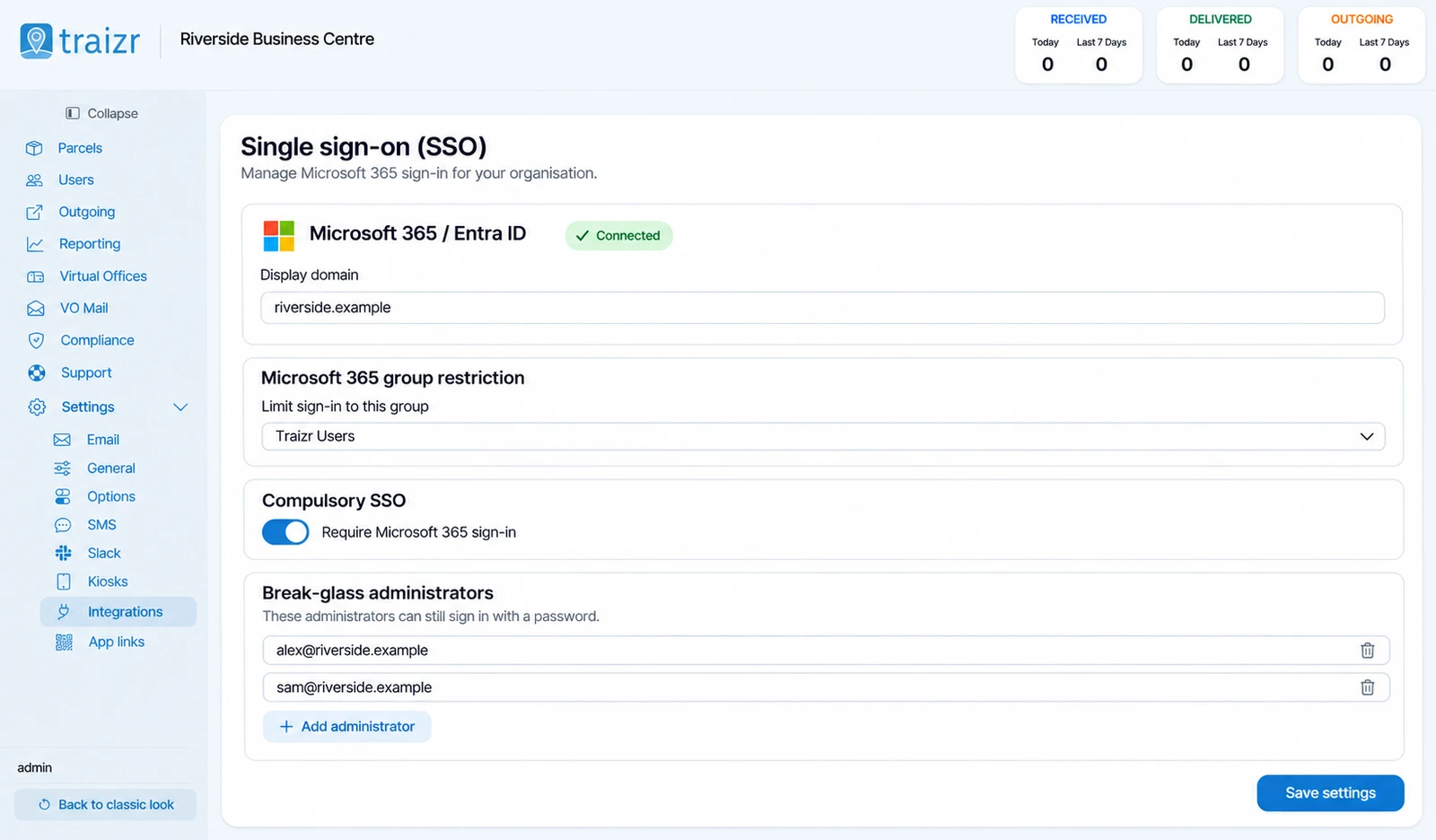
Admins use their Microsoft work account for the admin dashboard. Staff can use it in the Traizr app.
-
Access by group
Limit sign-in to members of the Microsoft 365 groups you choose.
-
Compulsory SSO
Make Microsoft sign-in the only way in for your organisation.
-
Break-glass admins
Named admins keep password and MFA access for emergencies, such as an outage at your identity provider.
-
No accounts created by sign-in
SSO never creates an account on its own. Only people already set up in Traizr can sign in.
-
Starters and leavers by SCIM
Entra ID sends starters, changes and leavers to Traizr. Leavers are deactivated and their parcel history is kept.
-
Minimum data shared
Only the fields Traizr needs are sent, and no tenant-wide directory read permission is required.
-
Your MFA rules apply
Multi-factor authentication for SSO users comes from your own Microsoft Conditional Access policies.
-
Works in the app
Mailroom staff can sign in to the Traizr app with Microsoft, then unlock with a PIN or Face ID.
Where you set it up
Both are configured by an administrator in the Traizr admin dashboard.
How it is set up
A short piece of work for your IT team, then it runs without anyone thinking about it.
We switch it on
SSO and SCIM are included. Ask us and we switch them on for your organisation.
Connect Microsoft Entra ID
An administrator connects Traizr to your Microsoft Entra ID and chooses which Microsoft 365 groups can sign in.
Choose how strict to be
Leave password sign-in available alongside Microsoft, or make SSO compulsory and name the break-glass admins who keep password and MFA access.
Turn on provisioning
If you want Entra ID to manage who exists in Traizr, turn on SCIM provisioning. Starters, changes and leavers are then sent to Traizr automatically.
Questions people ask
Does Traizr support single sign-on?
Yes, with Microsoft Entra ID (formerly Azure AD). Admins sign in to the admin dashboard with their Microsoft work account, and staff can sign in to the Traizr app with Microsoft.
Can we limit who can sign in?
Yes. Access can be limited to members of the Microsoft 365 groups you choose. SSO also never creates accounts on its own, so only people already set up in Traizr can sign in.
Can we make SSO compulsory?
Yes. SSO can be made compulsory for your organisation. Named break-glass admins keep password and MFA access, so you are not locked out if Microsoft sign-in is unavailable.
How is MFA handled for SSO users?
Through your own Microsoft Conditional Access policies. Admins who sign in with a password use compulsory two-factor authentication with an authenticator app.
What does SCIM provisioning do?
Microsoft Entra ID sends new starters, changes and leavers to Traizr using the SCIM 2.0 standard. Leavers are deactivated, not deleted, so their parcel history stays intact.
What data does SCIM share with Traizr?
Only the fields Traizr needs. No tenant-wide directory read permission is required.
Which identity providers are supported?
Microsoft Entra ID. If your organisation uses a different identity provider, talk to us about what you need.
Is SSO an extra cost?
No. SSO and SCIM are included, and switched on for your organisation on request.
Where can our security team find more?
The Trust Centre and the security page cover data separation, encryption, access controls and how we handle your data.
Other integrations


Want to see Microsoft sign-in on Traizr?
Tell us what you run and we will walk through the setup on your own data. About 20 minutes.